🏆 Our Verdict
Paperpile is a modern, web-based reference management tool tailored for researchers, students, and academics who require efficient, seamless integration with Google services. It excels in simplifying the process of citation management, especially for users heavily invested in Google Docs and Google Scholar. Compared to Zotero, which offers broad compatibility with multiple browsers and word processors, Paperpile’s tight integration with Google products makes it particularly appealing for users within that ecosystem, providing a streamlined user experience that enhances productivity.
✅ Pros & ❌ Cons
Pros
- Seamless Google Integration: Optimized for Google Docs and Google Scholar, making it ideal for users of Google’s suite.
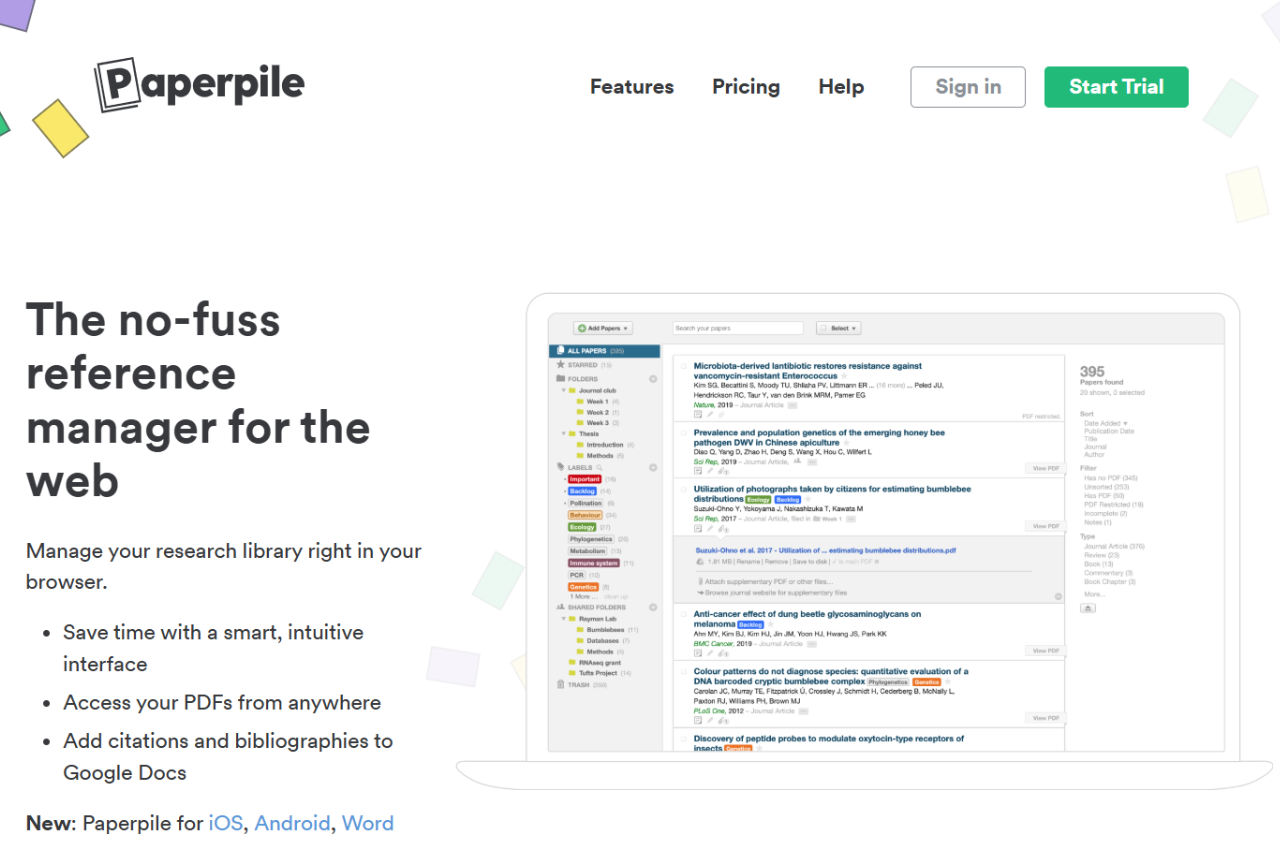
- User-Friendly Interface: Clean, minimalistic design that’s easy to navigate.
- Automatic PDF Download and Annotation: Efficient management of PDFs with direct downloading and annotation capabilities.
- Cloud-Based: Accessible from anywhere, with all data securely stored in the cloud.
- Collaboration Features: Facilitates easy collaboration via Google Docs.
Cons
- Platform Dependency: Primarily designed for Google Chrome; limited functionality with other browsers.
- Subscription Model: No free version available; requires a subscription.
- Limited Offline Functionality: Most effective with an internet connection.
- Fewer Citation Styles: While extensive, the citation styles library is not as comprehensive as Zotero’s.
📖 About
Paperpile is designed to streamline the research process by managing references, PDFs, and citations directly within Google Docs. It’s aimed at making academic writing cleaner, more efficient, and more connected.
🗓️ How It Works

- Setup and Integration: Install the Paperpile extension for Google Chrome.
- Import References: Easily import references from academic databases, websites, and existing libraries.
- Organize and Annotate: Organize articles and PDFs in folders, tag them, and annotate directly within the browser.
- Cite While You Write: Use the Google Docs add-on to insert citations and format bibliographies automatically.
- Collaborate in Real-Time: Share papers and collaborate on bibliographies with peers via Google Docs.
💲 Pricing Overview

Paperpile offers a range of pricing options tailored for different users, focusing primarily on accessibility and ease of use for academic and business purposes:
- Free Plan: While Paperpile offers a free trial, they do not have a permanent free version available. The trial allows users to test out features before committing to a subscription.
- Academic Plan: Priced at $2.99 per month, this plan is geared towards students, faculty, and other academic professionals. It includes features tailored for research management, such as PDF download and sync, annotation, organization tools, and citation support in Google Docs.
- Business Plan: At $9.99 per month, this plan targets business users and includes all the features of the Academic plan with additional support tailored for professional use in a business environment.
🥊 Competition

| Feature | Paperpile | Zotero |
|---|---|---|
| Platform Integration | Google Chrome, Google Docs | Firefox, Chrome, Safari; MS Word, LibreOffice |
| User Interface | Modern and intuitive | Functional, less modern |
| Access | Cloud-based, primarily online | Both cloud and local storage, works offline |
| Collaboration | Integrated with Google Docs for live collaboration | Supports group libraries and shared collections |
| Pricing | Subscription only | Free, with paid storage options |
📌 Conclusion
Paperpile is a robust tool for anyone embedded in the Google ecosystem, offering streamlined, efficient management of research materials and citations. While it may not have the wide-ranging compatibility of Zotero, its specialized focus on Google products makes it an excellent choice for users looking for simplicity and integration in their research processes.
Paperpile: Streamline Your Research in the Cloud