Hyperbeam: A Better Way to Watch Together Online

βš–οΈ Our Verdict

Hyperbeam is recommended for everyone that loves watch parties. This app offers a better way to watch together online as it allows you and other people to share the same browser. Since the pandemic hit, online watch parties have been a thing, with Hyperbeam, you can now enjoy hanging out with other people more, even when you’re physically apart.Β 

You are not only limited to watching movies on this app because you can also browse any website you can think of and share the browser with anyone! As amazing as it gets, this application has a built-in chat, audio, and video call. The customer service of this app is also superb just like the app itself!

Hyperbeam is free to use with an available premium plan upgrade. Overall, it is intuitive to use, fun, and an essential application for connecting with other people!

πŸ‘ ProsπŸ‘Ž Cons
πŸ‘ Shared browsing
πŸ‘ Good organization for the servers
πŸ‘ Good qualityΒ 
πŸ‘ Good customer service
πŸ‘ Free options
πŸ‘ Integrated chat and video call
πŸ‘ Downloadable app in desktop or mobile
πŸ‘Ž Website lag
πŸ‘Ž Has bugs
πŸ‘Ž Crashes
πŸ‘Ž Need to sign up
πŸ‘Ž Free account has a 3-hour browsing limit

🌟 About Hyperbeam

Hyperbeam is a web app for shared browsing that allows you to surf the web, listen, or watch together with anyone online. Hyperbeam helps you to stay close with anyone, even apart. It also helps you nurture your relationship with friends, family, and romantic partners.

Users can bring any friends to their room and take turns in controlling a shared virtual browser. This feature allows them to visit any website they want together. Hyperbeam uses an innovative technology called shared browsing results in a considerably better watch party experiences than screen sharing or video sync apps.

Hyperbeam was started as an engineering project and is now used by 150k monthly users and counting!

🎁 What’s In It For You?

The bread and butter of this app is the shared web-browsing feature. You can invite friends and surf the web together. It lets you browse and share control with friends. This app’s shared browser is synchronized but designed to be simple and easy to use. Hyperbeam allows you to easily enjoy time with anyone whether you are on your phone, laptop, or tablet.Β 

Hyperbeam is also equipped with everything you need! It lets you express yourself better with the features such as voice and video calls, GIFs, emojis, and many more! This allows you to have a better watch party experience.

πŸ–₯️ How Does It Work?

  1. Click the β€œAdd Room” button at the top-right corner of the interface.
  1. Add a name and a picture to your room then click β€œCreate”.
  1. Generate an invite link by the green + button.
  1. Send the link to your friends and they will see the invitation page with your room name and picture.
  1. All of your active friends are shown below. The profile with the cursor is the one controlling the browser.
  1. Click the β€œRequest Control” button to request control or click your profile picture in the hub. Transfer control by clicking the profile picture of your friend on the hub.
  1. Click the trust mode if you want to let people take control without approval.

πŸ’² Pricing Plans & Support

The pricing plans for Hyperbeam are simple and straightforward. This app is originally for free and has a premium plan if you wish to access more features such as custom URLs, ultra bitrate, and more!

πŸ’Ž Freemium – $0/Month

This amazing plan is free for life!

〰️ 3 hours limit for browsing and 10-minute waiting time

γ€° ️Shared web browsing

〰️ Text, voice, and video chat

〰️ All the other features!

πŸ’Ž Premium – $4.99/month

This amazing plan is only $4.99 per month!

〰️ Unlimited session length

〰️ Everything at free

〰️ Animated profile pictures

〰️ Custom invite links

〰️ Ultra bitrate

πŸ“ The Competition

πŸ‘ ProsπŸ‘Ž Cons
πŸ‘ Shared browsing
πŸ‘ Public rooms
πŸ‘ Integrated chat and call
πŸ‘Ž Privacy issues
πŸ‘Ž 8 people maximum
πŸ‘Ž Lag and bugs

Watch together online with Hyperbeam

Ludus 1.0: Collaborative Presentations for Creative Teams

βš–οΈ Our Verdict

Using Ludus will solve your problem regarding sharing, compatibility, collaboration, creativity, and much more! It is recommended for everyone to use, especially for creatives and designers. Everyone can use it too but it has a learning curve that is worth the time if you can use it correctly.

This app might be the solution for the problems that our presentation tools have nowadays. It is not restrictive so you can let your imagination run wild and express your creativity. It has a lot of features and we can say that this is a powerful tool for a web application. Using Ludus will cure your boredom and fatigue since you will enjoy using this app.Β 

This presentation tool is affordable, especially for huge teams. As remote work is now a thing, allow Ludus to be your companion in presenting!Β 

Overall, Ludus is packed with features, affordable, and a powerful application that can serve your presentation needs well.

πŸ‘ ProsπŸ‘Ž Cons
πŸ‘ Live collaboration
πŸ‘ Google drive integration
πŸ‘ Creative templates
πŸ‘ Dark/light modes
πŸ‘ Sophisticated tools
πŸ‘ Many resources i.e. fonts and graphics
πŸ‘ Drag and drop
πŸ‘ Free trial for 30 days
πŸ‘Ž Has bugs
πŸ‘Ž Paid application
πŸ‘Ž Technical to use
πŸ‘Ž Relies on internet

🌟 About Ludus

Ludus is a powerful web presentation tool for creative teams that aspire for sophistication in their creation and collaboration. It combines creativity with simplicity. Ludus is more than a presentation tool since it is also a tool to communicate, collaborate, learn, and play.Β 

It has a lot of features that designers are familiar with. From fonts and graphics to blending modes, this app allows you to create without limitations. With the integrations from Unsplash, GIPHY, Dropbox, Google Drive, etc., you can add anything you want.Β 

Ludus was created because of the existing presentation tools that do not allow you to collaborate efficiently and limit your creativity. This tool solved the creators’ problems and now helps thousands of teams all over the world.Β 

🎁 What’s In It For You?

Ludus allows you to work together on a presentation effortlessly. This app finds the right balance between working together and controlling your privacy. It lets you define boundaries for collaboration so you are in full control. With the live collaboration feature, you can fluidify your team’s workflow.

With this app, creatives can put together presentations the same as they could with other creative tools. Ludus makes designers feel at home by the features of the app. The keyboard shortcuts, workflow, and UI, everything feels familiar allowing designers to be productive at a snap.Β 

You can do everything with all types of content; ranging from the crop, corner radius, drop shadow, filters, blend modes, and skew. Ludus also has numerous templates and themes that you can change in one click. The fonts on this app are also limitless as you can upload your preferred font as TTF or OTF.Β  Ludus also allows you to quickly share, save, and reuse assets across your team and presentations by the smart blocks feature.

Lastly, Ludus lets you present the way you like. Live, remote, or even without you being there. You can record yourself on top of your slides to make them clearer for the audience.

πŸ–₯️ How Does It Work?

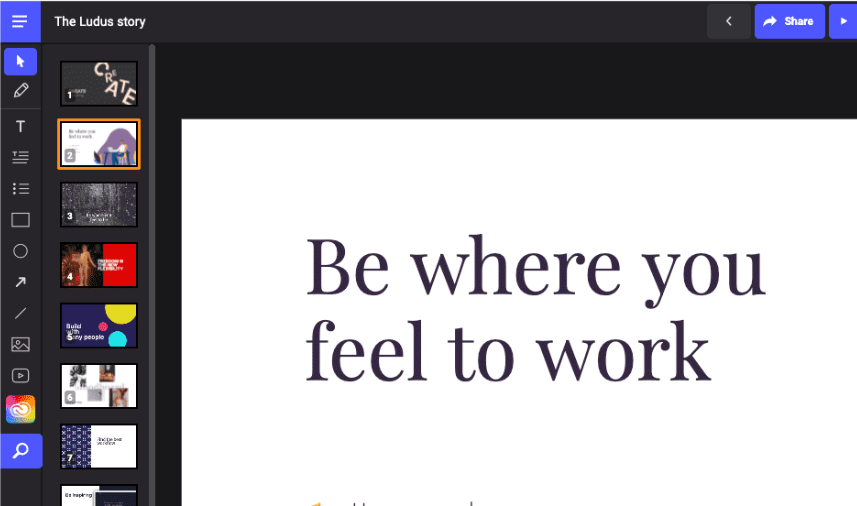
  1. The dashboard shows your presentations with the tags system.
  1. The left navigation shows the basic editing features. You can add texts, shapes, and lines. You can upload images or videos. Here you can also access the code editor and the smart menu.
  1. On the right menu, you can edit the size, position, depth, rotation, fill, gradient, stroke, and opacity of all your objects.
  1. Use keyboard shortcuts to quickly add, duplicate, move, and remove slides on the slide manager.
  1. The smart menu contains everything you need. You may access it with your mouse or your keyboard (tab key).Β 
  1. You can add graphics by the drag and drop feature. You can also edit the icons the way you like.Β 

πŸ’² Pricing Plans & Support

Ludus offers unique pricing for all kinds of users! The prices vary according to the number of users and all plans contain all the features. Now you can get what you want!

πŸ’Ž Ludus small – $14.99/Month per user

This deal for 1 to 15 users is only $14.99 per month per user!

〰️ Unlimited team members

γ€° ️Unlimited presentations

〰️ Unlimited storage

〰️ All of the other features

πŸ’Ž Ludus medium – $13.99/Month per user

This deal for 16 to 35 users is only $13.99 per month per user!

〰️ Unlimited team members

γ€° ️Unlimited presentations

〰️ Unlimited storage

〰️ All of the other features

πŸ’Ž Ludus large – $12.99/Month per user

This deal for 36 to 50 users is only $12.99 per month per user!

〰️ Unlimited team members

γ€° ️Unlimited presentations

〰️ Unlimited storage

〰️ All of the other features

πŸ’Ž Ludus corporate – $11.99/Month per user

This deal for 51 users and above is only $11.99 per month per user!

〰️ Unlimited team members

γ€° ️Unlimited presentations

〰️ Unlimited storage

〰️ All of the other features

πŸ“ The Competition

πŸ‘ ProsπŸ‘Ž Cons
πŸ‘ Good templates
πŸ‘ Not restrictive
πŸ‘ Many resources i.e. graphics, photos, icons
πŸ‘ Works fast
πŸ‘ Live collaborationΒ 
πŸ‘Ž Shapes are limited
πŸ‘Ž Has a learning curve

Enjoy collaborative presentations for creative teams with Ludus 1.0!

Tilde: Free, instant meeting rooms for all your collaborative needs

βš–οΈ Our Verdict

Tilde is a must for everyone working remotely! It is one of the easiest-to-use video-conferencing applications out there. It saves you time and effort, preventing you from experiencing fatigue from online sessions. It has multiple features that other bland apps do not have. From instant creation of meetings to a built-in whiteboard, and many more, this application is packed with all the goodness!Β 

This application is a convenient and refreshing take on online meetings, making it a great tool for your remote needs. It promotes the engagement of its users because of the features and the creative design. What’s more amazing is that Tilde is a free app!Β 

This app can be used by students, organizations, professionals, and etcetera because of its versatility. To sum it all up, Tilde is easy to use, efficient, and a necessity for your online meeting needs.

πŸ‘ ProsπŸ‘Ž Cons
πŸ‘ Multiple templatesΒ 
πŸ‘ Free app
πŸ‘ No sign up needed
πŸ‘ Instant meetings
πŸ‘ Collaborative notes
πŸ‘ Screensharing and file sharing
πŸ‘Ž Few integrations
πŸ‘Ž Limited customization features
πŸ‘Ž Meetings cannot be recorded
πŸ‘Ž Room limited to 20 people

🌟 About Tilde

Tilde is a video conferencing software that makes meetings a lot more structured, efficient, and inclusive for all. Tilde’s meeting rooms are free and instantly accessible thus, it is energy-saving to use. This app is an interactive meeting space where anyone can create a virtual room with lots of features!

Tilde was created due to the reason that virtual meetings are drawing out the energy in us, staring at each other every day through boring boxes. Considering the significance of virtual meetings for remote teams, Tilde’s team believes that there should be a better option. That is why they built a great virtual meeting tool.

🎁 What’s In It For You?

Tilde lets you create an instant meeting for your collaborative needs for free, without having to sign up. No need to switch between apps or tabs because this app allows you to capture ideas directly from a meeting through several features like collaborative notes, whiteboard, screen sharing, and file sharing. The meeting’s contents get saved even after the meeting has ended, so you can go back to the link and return to where you left off.

This is a hassle-free video conferencing software as there is no need to sign up for an account to create or join a meeting. Simply click create, share the link, and let your participants join the meeting with a single click! Tilde also offers different meeting templates for different purposes such as daily stand-up, weekly sync-up, one-on-one, happy hour, and many more!

This application offers more than just a video call. Multiple participants can share their screens simultaneously! Tilde also allows you to create breakout rooms smoothly. Tilde indeed offers everyone a delightful space to have a meeting!

πŸ–₯️ How Does It Work?

  1. Click create an instant meeting.
  1. Choose an appropriate template for your meeting.
  1. Copy the link then send it to other participants.
  1. Drag your avatar to move wherever you want. You can also move the contents on the screen by dragging them on the top.
  1. At the bottom bar, you can add other content such as links, sticky notes, whiteboard, youtube videos, collaborative notepad, files, and a breakout room called a huddle.

πŸ’² Pricing Plans & Support

Tilde is a free application at the moment. You can enjoy all of its amazing features without having to pay!

πŸ“ The Competition

πŸ‘ ProsπŸ‘Ž Cons
πŸ‘ Fun and easy to use
πŸ‘ More interactive features
πŸ‘ Free app
πŸ‘ Great UI
πŸ‘ No installation needed
πŸ‘Ž Inappropriate for formal meetings
πŸ‘Ž Meetings cannot be recorded
πŸ‘Ž Supports only 20 participants with video, 100 participants in total during a session.
πŸ‘Ž Need to sign up to host a meeting

Get free, instant meeting rooms for all your collaborative needs with Tilde

Tella 2.0: Record instantly shareable videos, from your web browser

βš–οΈ Our Verdict

Tella should be used by everyone who wants to connect to other people behind screens. It can be used by professionals, educators, and others that want to showcase their work instantly! Tella allows you to communicate better and easier as it is just a web app that can be accessed quickly.Β 

You can amaze your audience with presentation features that are fun and dynamic. Give your work and knowledge the treatment it deserves. Using this app can also save you time since you can’t swap calls and meetings for asynchronous sessions.Β 

All in all, Tella is amazing because it has a lot of customization features, it is easy to use, and it allows you to relay your messages instantly all for a fair price!

πŸ‘ ProsπŸ‘Ž Cons
πŸ‘ Free app
πŸ‘ Unlimited recording duration
πŸ‘ Instant sharing and export
πŸ‘ Customization features
πŸ‘ Easy and intuitive to use
πŸ‘ No download needed
πŸ‘Ž Slow and laggy
πŸ‘Ž Need to sign up
πŸ‘Ž Has watermark on free account
πŸ‘Ž Limited to 100 stories on free account

🌟 About Tella 2.0

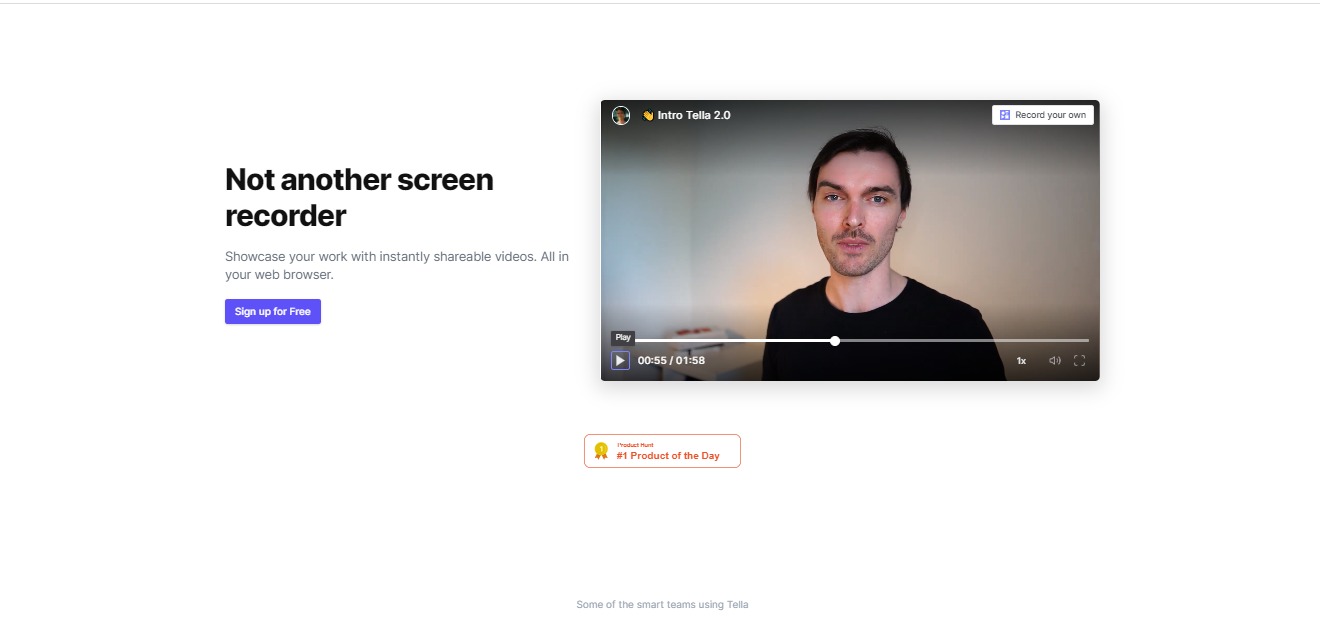
Tella is a screen recording app on a web browser that lets you record yourself, your screen, or even upload slides. It does not require installing any plugins or apps. This application helps founders, creators, teams, and educators to showcase their knowledge and share their work through a video recording.

With Tella, it is like a camera that lives on your web browser, so recording a video is as fast as opening a new tab. Tella is used for product demos, presentations, launch videos, how-to’s, sales pitches, corporate communications, course design, storytelling, and much more!

🎁 What’s In It For You?

Tella allows you to record yourself as well as your screen or presentations. It lets you combine multiple recordings as a single video. Tella also has different customization features that allow you to work easily with custom backgrounds, styles, and camera or video frames.

After creating your video, Tella lets you share your videos and lets your viewers view them instantly from the link that you share. With this application, you can showcase your work, be more productive, save time, and amaze your viewers with fun and dynamic videos.Β 

The features do not stop there as you can also remix your Tellas and combine different videos to make a new one. With all of the features of this application, it is also fast and loose as you just need to hit record, do your thing, and then share it instantly.

πŸ–₯️ How Does It Work?

  1. Allow Tella to access your camera and microphone, then turn on your camera and microphone from the lower right buttons beside the record.

2. You can also share your screen and import or upload your slides.Β 

  1. Press the record button if you are all set.
  1. After recording, you can change the layout and background of your video and even upload a photo as a background.
  1. With the scenes feature, you can compile your videos and record another take if you made a mistake.Β 
  1. After editing, you can share your videos anywhere instantly using the share button on the upper right corner.Β 

πŸ’² Pricing Plans & Support

Tella’s pricing is just like how to use their app, it is pretty simple!

πŸ’Ž Starter – $0/Month

The easiest way to start using Tella is for free!

〰️ 100 Stories

γ€° ️Unlimited recording duration

〰️ Instant sharing

〰️ ExportΒ 

πŸ’Ž Pro – $19/Month

To create videos like a pro, this deal is only $19 per month!

〰️ Unlimited stories

γ€° ️Unlimited recording duration

〰️ Instant sharing

〰️ ExportΒ 

〰️ No watermarks

〰️ Password protected links

πŸ“ The Competition

πŸ‘ ProsπŸ‘Ž Cons
πŸ‘ Easy to use and good user interface
πŸ‘ Shareable links
πŸ‘ Secured sharing features
πŸ‘ Customization features
πŸ‘Ž Some bugs and lags
πŸ‘Ž No templates
πŸ‘Ž Pricing is linked to bandwidth

Record instantly shareable videos, from your web browser with Tella!

Humit: The social music sharing and discovery app

βš–οΈ Our Verdict

If you love music and adventuring into different songs, this app is definitely for you! The moment you open Humit, it is all love. This app is a wonderful way to share and discover music. Sharing and discovering music is now easier and faster than before.Β 

This app allows you to share small but substantial parts of your favorite songs. In return, you can discover lots of songs that fall on your music taste. Humit does not use algorithms to recommend songs to you. Rather, it allows you to see other users that share the same interests as you, that is why it is on a more personal level. You can even chat with other users to discuss and recommend songs!

The only requirement for a meaningful experience on this app is a premium Spotify account as developers are still working on support for non-premium Spotify and apple music users.

With everything mentioned, this app is free to download on iOS and google play. To sum things up, Humit is easy, fun, and addictive to use suitable for all the music lovers out there!

πŸ‘ ProsπŸ‘Ž Cons
πŸ‘ Easy to use
πŸ‘ Good user interface
πŸ‘ Practical music sharing app
πŸ‘ Many features
πŸ‘ Free app
πŸ‘Ž Only on iOS and Google Play, no web app
πŸ‘Ž Has bugs
πŸ‘Ž Not useable when Spotify is not on premium
πŸ‘Ž Limited music app integrations so far

🌟 About Humit

Humit is a social networking app made specifically for music sharing and discovery. It is like when Reddit and Spotify had a child! This app is for music lovers as it allows you to flaunt your amazing music taste and also discover music from other people that have the same taste as you.Β 

This app is a new platform to interact and bond with like-minded music fans from all over the world. It makes music sharing and discovery as fun as vibing with your favorite tunes. The concept of this app plays around letting the users share their favorite part of songs by sound bites or 30-second audio clips. These clips are referred to as β€˜hums’ and can be conveniently accessible to their followers in a feed of fresh music.

🎁 What’s In It For You?

Humit allows you to share and discover songs practically by using a 30-second snippet of the most interesting part of the song or a β€˜hum’ so you don’t need to listen to the whole song. With this, you can save a lot of time and also discover or share more songs! All you need is a Spotify premium account, then you are ready to go!

You don’t have to switch between apps to share music and engage with other people. Humit has integrations and other features that are truly useful and makes this app all in one. It allows you to browse through your feed which includes the stations that you follow, your friends, and songs that are similar to your music taste.Β 

Humit also lets you experience an enhanced hum creation, personalized station or friend recommendations, and improved support for passive listening. This app also allows you to share stations and profile pages externally. Lastly, you can engage with friends and like-minded listeners through the chat feature of this app!

The future of music is bright with Humit. Music sharing and discovery have never been easier!

πŸ–₯️ How Does It Work?

  1. Discover music and other people with the same taste as you on the feed.
  1. Share snippets of your favorite songs through hums. You may customize the photo or even add a caption.
  1. You can search for specific stations or users to follow.
  1. Use the chat feature to recommend songs and engage with other users.

πŸ’² Pricing Plans & Support

As amazing as it gets, Humit is unbelievably a free app! Music lovers now have a platform to express themselves more without having to spend anything.

πŸ“ The Competition

πŸ‘ ProsπŸ‘Ž Cons
πŸ‘ Free app
πŸ‘ Many integrations
πŸ‘ Clean and simple user interface
πŸ‘ Many features
πŸ‘Ž iOS only
πŸ‘Ž Sign up only available on mobile

Try the latest social music sharing and discovery app with Humit

Butter: All-in-One Tool for the Smoothest Virtual Workshops 🧈

βš–οΈ Our Verdict

As online sessions are now a thing, Butter would be the best option for the best workshop experience. It provides many features that bring back the joy and energy of the participants in online meetings. One of the values in Butter is that they embrace silliness; this is what makes Butter a unique app.

By using Butter, you and your team will never be tired and bored when meeting online. The reactions, music, integrations, and other features of Butter are gonna make you want to use this app over and over again!Β 

Even with the multiple features of Butter, you might think that this app will be too technical and hard to use. But surprisingly, Butter is super easy and intuitive to use. Plus it is a free app!Β 

πŸ‘ ProsπŸ‘Ž Cons
πŸ‘ Fun and easy to use
πŸ‘ More interactive features
πŸ‘ Free app
πŸ‘ Good visuals
πŸ‘ Great UI
πŸ‘ No installation needed
πŸ‘Ž Inappropriate for formal meetings
πŸ‘Ž No recording of sessions
πŸ‘Ž Supports only 20 participants with video, 100 participants in total during a session.
πŸ‘Ž Need to sign up to host a meeting

🌟 About Butter

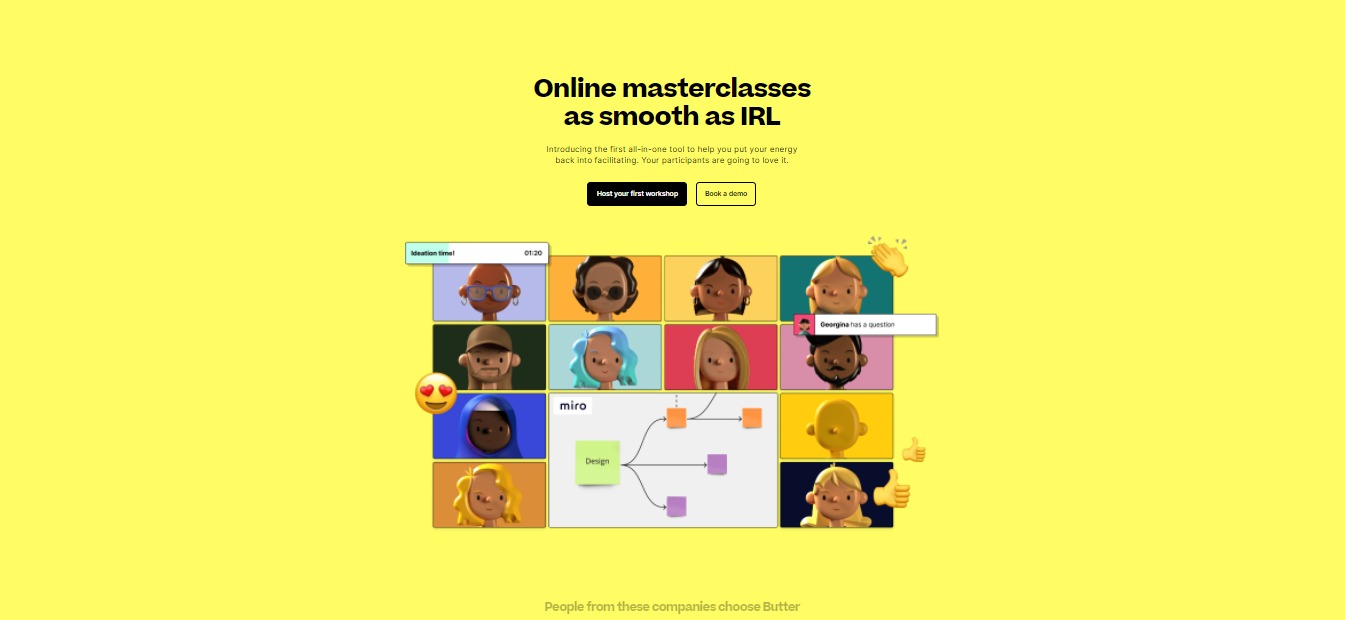
Butter is a powerful and delightful platform for workshops and training online. This app is a tool built specifically for hosting online sessions that are engaging and interactive as smoothly as possible. Butter focuses on giving the facilitators all the tools they need in one space to provide the best workshop experience for everyone.Β 

Butter is created because online workshops seemed to be off and did not feel as valuable as they used to be. With this app, online workshops are made to be as interactive and engaging as possible. Now you can have online sessions that can elevate the team’s energy and focus on what truly matters!

🎁 What’s In It For You?

Butter allows you to stay on task with the timeboxed agenda and minimize awkwardness because conversations flow better with a queue that you can manage. It allows the users to collaborate more effectively by using the integrations such as Miro, Google Drive, YouTube, and Whiteboard.Β 

Butter allows the participants to be heard by using fun reactions, sounds, and GIF chats! You can also manage breakout groups with little effort with customizable breakout setups, broadcast messaging, and a Peek function. You can also use polls to get answers from your participants and show the results.Β 

Even the waiting room is just as fun! You can customize the waiting room before participants enter, plus it has music! After the session, you can access session recaps with chat logs, notes, and poll results from the dashboard. Butter lets you reuse your room settings and templates. This app also features ultra-secure security and privacy infrastructure and EU-level GDPR compliance.Β 

The best part of Butter is that there is no installation needed. It can run on your browser and up to 100 people can join using the link.Β 

πŸ–₯️ How Does It Work?

  1. Create a room by clicking on the create new room button
  1. Customize your room name and picture. You can reuse your settings for recurring sessions.
  1. Customize the waiting room for the participants before they enter the meeting.
  1. You may edit the agenda, timers, and polls beforehand.
  1. Invite participants through the link provided.
  1. Use reactions and soundboard buttons to interact.
  1. Activate the pre-made polls.
  1. Use integrations on the right side buttons of the screen.

πŸ’² Pricing Plans & Support

With one-of-a-kind facilitator tools, Butter will melt your mind as it is a free app. You can now turn boring workshops into a memorable experience without having to spend money!

πŸ“ The Competition

πŸ‘ ProsπŸ‘Ž Cons
πŸ‘ Phone system integration
πŸ‘ Easy to use
πŸ‘ Multiple features
πŸ‘ Good security
πŸ‘ Free account
πŸ‘Ž Attendees are limited
πŸ‘Ž Few integrations
πŸ‘Ž Sometimes lagging
πŸ‘Ž Cannot share file while meeting

FigJam by Figma: An online whiteboard from Figma designed for teams

βš–οΈ Our Verdict

FigJam is very essential to your collaboration purposes. It has amazing features that make designing and creating ideas easy for everyone. This app is thoughtfully designed for brainstorms, journey mapping, research, and more!

You can collaborate in real-time with your team and communicate with them without the need to use another app. Your sessions will be more effective and efficient by using FigJam. It is not only easy, but it is also fun to use!Β 

With FigJam, collaborating has never been easier and more fun! This app is a must especially that online team sessions are now a thing.Β 

πŸ‘ ProsπŸ‘Ž Cons
πŸ‘ Playful and easy to use
πŸ‘ Real-time collaboration feature
πŸ‘ Good templates
πŸ‘ Good support team
πŸ‘ Useful design features
πŸ‘ Free account is not limited
πŸ‘Ž Has bugsΒ 
πŸ‘Ž Does not allow guest collaborators
πŸ‘Ž Some fonts are not supported

🌟 About FigJam

FigJam is an online whiteboard browser that is created especially for teams to collaborate, brainstorm, map out flows, and explore ideas together. All of these activities need a dedicated space. FigJam allows this to happen by giving the users a platform to collaborate freely and smoothly.Β 

This app is well designed, fun to use, and made for designers and their teams. It is easy to learn and use for anyone, not just designers. FigJam allows users to have fun and bring out the playfulness in them to fully express themselves.Β 

🎁 What’s In It For You?

FigJam lets you express your ideas through sticky notes. You can sketch ideas and connect the dots by using markers, shapes, and connectors. This app also lets you diagram your ideas by mapping user flows, processes, systems, and more. It is easy to learn and intuitive to use, allowing you and your team to keep flowing and jamming.Β 

FigJam also has different features that can help you communicate with your team. You can express how you feel in the moment by using emotes, you can approve ideas by giving stamps, you can say something instantly through the cursor chat, and you own your work through the use of stickers and assets. This app also lets you easily paste in designs from Figma.

You can do research and mood boards through FigJam by collecting, organizing, and synthesizing findings. FigJam also has different templates to help you get started!Β 

πŸ–₯️ How Does It Work?

  1. Choose a template or start from scratch.
  1. Create and ideate meaningful designs by using the buttons below the screen.
  1. Use stickies to share your thoughts by pressing β€˜S’ or by using the button below. You can create multiple stickies.
  1. Use connectors to link together related stuff. Press shift and C then drag to draw a connector. Double click a connector to add text.
  1. Quickly share thoughts through the cursor chat by pressing β€˜/’. Others can see your message as you type.
  1. You can quickly react with disappearing emotes or leave permanent stamps by pressing β€˜E’.
  1. Use stickers from the team library button below. You can drag and drop the stickers.
  1. You can copy and paste a design from Figma to quickly gain feedback and edit text.
  1. Add collaborators by clicking the share button in the upper right corner.

πŸ’² Pricing Plans & Support

FigJam offers amazing pricing that is worth the budget!

πŸ’Ž Starter – Free

Start with the basic features of FigJam for free!

〰️ Unlimited files in drafts

γ€° ️Unlimited viewers and commenters

〰️ Unlimited editors on 3 team files

〰️ 1 team project

〰️ 30-day version history

〰️ Unlimited cloud storage

πŸ’Ž Professional – $12 per editor/Month

Brainstorm, ideate, and diagram together with the professional account for only $12 per month!

〰️ Unlimited projects

〰️ Unlimited version history

〰️ Custom file/user permissions

〰️ Invite-only private projects

〰️ Shareable team libraries

πŸ’Ž Organization – $45 per editor/month

Brainstorm, ideate, and diagram together with the organization account for only $45 per month!

〰️ Everything in professional

〰️ Org-wide design systems

〰️ Centralized teams

〰️ Private plugins

〰️ Plugin administration

〰️ Shared fonts

〰️ SSO + advanced security

〰️ Design System Analytics

πŸ“ The Competition

πŸ‘ ProsπŸ‘Ž Cons
πŸ‘ Great for collaboration
πŸ‘ Clean and easy to use
πŸ‘ Good interface
πŸ‘Ž Sometimes lagging
πŸ‘Ž Glitches
πŸ‘Ž You can’t add in files, images are only permitted

Create team online whiteboards with FigJam!

Zeneca: Share Your Favorite Books with the World

βš–οΈ Our Verdict

Zeneca is a great website for avid readers. It’s a nirvana where you can share your favorite books with like-minded people from all over the world. Inside Zeneca, you can see other people’s book recommendations and share your own. It’s like having a book club with different people from across the globe. We are absolutely in love with it!

πŸ‘ ProsπŸ‘Ž Cons
πŸ‘ Share your favorite books with others
πŸ‘ Get book recommendationsΒ 
πŸ‘ Easy to use platform
πŸ‘ Free to use
πŸ‘Ž The design of the website needs tweaking, but it does its purpose.

🌟 About Zeneca

Zeneca was founded to create a virtual library for everyone across the globe. It’s a great place to showcase your favorite and beloved books. It was founded so you can share books with your community and discover what others read.Β 

🎁 What’s In It For You?

This amazing platform is pretty straightforward: it’s an online library for book lovers across the globe. Sounds simple enough, right? It’s very easy to use, and you can see what other like-minded people are reading.

Zeneca is a virtual library created for book lovers like you. Soon enough, they will have their own forums, commenting boxes, and communities where people can share their thoughts and engage in discussions with other book lovers.Β 

πŸ–₯️ How Does It Work?

To try Zeneca for yourself, visit their website at https://www.zeneca.io/. Their website is simple and straightforward so it is very easy to navigate.

First, you have to sign up for an account. Simply click the β€œSign Up” button to create an account.

Enter the necessary details into each field.

Once you have signed up, you will receive a message with instructions on how you can visit your account. Look for the confirmation in your email.

The sign-in email should look like this:

Once you click the link, you will be redirected back to Zeneca inside your account. Your dashboard will look like this:

You can edit your library, add your website, and social media handles.

πŸ’² Pricing Plans & Support

The best thing about Zeneca is that it is a free platform for book lovers. Yes, you can use their services without paying fees!

πŸ“ The Competition

πŸ‘ ProsπŸ‘Ž Cons
πŸ‘ Access to thousands of books
πŸ‘ Easy to use platform
πŸ‘ Free to use
πŸ‘Ž The UX could use some updates