Tango: Automatically create how-to guides with screenshots

βš–οΈ Our Verdict

Tango should be used by everyone that finds creating how-to guides dreading. It instantly creates guides for you so you can save a lot of time and effort. This is important especially in the work environment where constant communication between employees is occurring. With this tool, you do not have to repeat what you just said or demonstrated.Β 

People should use Tango to onboard and train newly employed workers. It can also be used to establish and circulate best practices and SOPs. With tango, you can release notes on new product updates. Not only that, but you can also make customer service easier with this application. 

The unique thing about this app is that it uses screenshots instead of the actual video recording of the process. All in all, Tango is easy to use, essential, and effective for creating how-to guides instantly.

πŸ‘ ProsπŸ‘Ž Cons
πŸ‘ Instant how-to guides using screenshots
πŸ‘ Easy to use
πŸ‘ Free
πŸ‘ Good User Interface
πŸ‘Ž Available as Chrome extension only
πŸ‘Ž Screenshot tool only
πŸ‘Ž Only works on Chrome browser

🌟 About Tango

Tango is a documentation application that allows you to make how-to guides with screenshots instantly. It was created to make systems training and process documentation easier. Writing guides and screenshotting every step is stressful and takes a lot of time. With Tango, it resolves that problem.

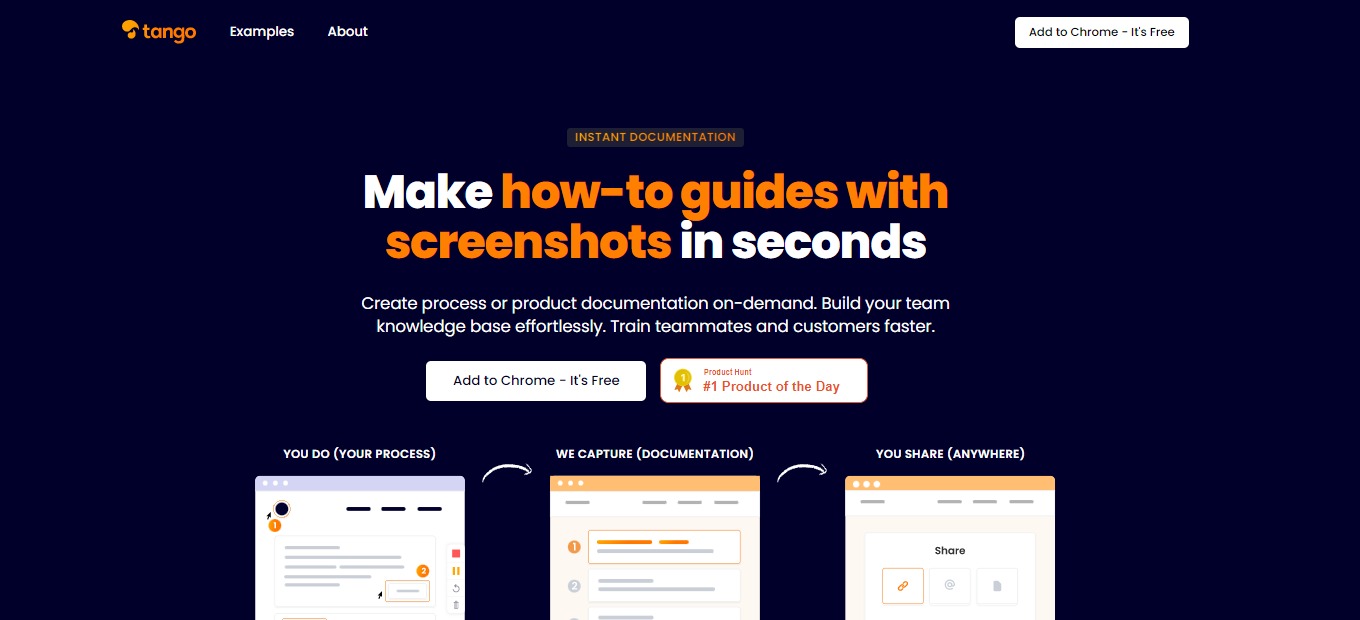
Tango is a Chrome Extension, but this does not hide the fact that Tango is a compact and powerful tool. Using it is also easy as you just hit β€œCapture” and the rest is done by the application. The how-to guide that is created by Tango is editable by the user. With this, create a process or product documentation in an instant, build your team knowledge base easily, and train teammates and customers faster! β€œYou do, we capture, and you share”.

🎁 What’s In It For You?

Tango lets you automatically capture your actions in the browser, on any site. Tango allows you to edit and annotate the titles, descriptions, and URLs for more customization. For more privacy and emphasis, Tango lets you mark up and blur parts of your screenshots. This application offers an easy way to create how-to guides. It saves your time and effort!

The screenshot cropping and annotation are automatically done by Tango, but you can always opt to edit it by yourself. It also generates the step-by-step instructions automatically. After everything, Tango allows you to store and retrieve your guides and share them anywhere.

πŸ–₯️ How Does It Work?

  1. Add Tango to your Chrome Extensions then open it to begin.
  1. Click the β€œCapture Workflow” to start recording and documenting your procedures automatically.
  1. The Tango Controller allows you to pause the recording and capture only when you want to.
  1. Do all the procedures and let Tango record it for you automatically.
  1. The steps are shown on the left side of the screen. Click the red button to generate your Workflow.
  1. On the Web App, you can view, edit, and share your Workflow.
  1. When you are done editing, click on the share and export button. Copy the link and send it to any platform.

πŸ’² Pricing Plans & Support

Tango being a great and useful application is unbelievably free! Since this application is new, the paid version with additional team-focused features is set to be released in December 2021. Fortunately, there will always be a free version!

πŸ“ The Competition

πŸ‘ ProsπŸ‘Ž Cons
πŸ‘ Create demo videos using screen recording
πŸ‘ Simple and easy to use
πŸ‘ Free app
πŸ‘Ž Cannot add files other than photos and videos
πŸ‘Ž Website lag

Automatically create how-to guides with screenshots with Tango

Swop.it: Exchange stuff smart

βš–οΈ Our Verdict

Swop.it is a great application for trading goods. This application promotes sustainability and re-using items. Swop.it should be used by everyone since it helps the environment in a way because of conservation. It also serves importance in our modern problem which is overconsumption. This is an alternative to throwing away things and buying new ones.

The features and the usability of this app make bartering look easy. The application itself is great, but there is room for improvement especially on bugs. The user experience also depends on the community because, in some places, there are very few users. 

Summing it all up, Swop.it is easy to use, eco-friendly, and a great alternative to buying and consuming goods! Now you can easily get what you want while saving money and the environment.

πŸ‘ ProsπŸ‘Ž Cons
πŸ‘ Barter system
πŸ‘ Free
πŸ‘ Modern and simple UI/UX
πŸ‘ Easy to navigate and great usability
πŸ‘ Convenient application
πŸ‘ Android/iOS application
πŸ‘Ž Allows duplicate posts
πŸ‘Ž Has ads
πŸ‘Ž Bugs
πŸ‘Ž No contact support

🌟 About Swop.it

The barter system has been around for centuries and is used throughout history. It is also currently happening through groups, chats, and classified or local swaps. Swop.it serves as a platform for bartering that happens with the help of technology. Swop.it is an application for exchanging items without the use of money.Β 

Swop.it is an easy way to get what you want while dispatching things that you do not need anymore. You can find great goods around your vicinity and swap stuff for free! It means that you can exchange things that you do not need anymore for something useful. The items that will be shown on your application are based on your location and interests. 

This application uses an algorithm that matches goods based on location and interests, aiding users to get what they want immediately after listing a product. Even of different values, Swop.it can create a chain of exchanges to make ends meet. Place an offer now and see what you can get in return instantly!

🎁 What’s In It For You?

Swop.it allows you to list your goods and make a deal in just a few clicks with their amazing user interface and functionality. It saves your time and effort since the application does all the hard work with its algorithm. This application lets you use your own delivery service and deposit system for a smooth and safe exchange. 

Found a product but it cannot be exchanged for yours? Swop.it allows you to get the product that you want with the group exchange feature. This chain of exchanges lets you and the owner of the desired product get what they desire. With the different exchange options, Swop.it gives you the freedom to choose what you want to exchange for the product that you are interested in. 

Not only that but Swop.it also has in-app chats and even audio or video calls. No one will gain access to your personal data as these features are encrypted and protected. In addition, this application uses a geolocation filter to allow you to find any stuff you like close to you.Β 

πŸ–₯️ How Does It Work?

  1. Scroll and look for a product that you like.
  1. Choose a product and click suggest swop. 
  1. Select an offer to swop.
  1. You can suggest group exchange then select the number of participants.
  1. Discuss the details in the free chat, audio, or video call.
  1. After discussing the details, you may now send your item and receive what you want.

πŸ’² Pricing Plans & Support

With the amazing features and concept of Swop.it, this application is free to download! It comes with in-app purchases that users can buy on their own accord. Now you can barter for goods and get the stuff you like without spending money!

πŸ“ The Competition

πŸ‘ ProsπŸ‘Ž Cons
πŸ‘ Barter system
πŸ‘ Simple and intuitive to use
πŸ‘ FreeΒ 
πŸ‘Ž Has ads
πŸ‘Ž Bad community
πŸ‘Ž Technical issues

Exchange stuff smart with Swop.it

Unicorn Platform 4.0: Simple drag & drop landing page builder for startups

βš–οΈ Our Verdict

Unicorn Platform is a good application for creating landing pages. It is suitable for anyone, especially newbies and people without coding experience. This app should be used by startup businesses or anyone that requires a good and simple website. 

Unicorn Platform is very easy and simple to use. But with that simplicity comes a bit of disadvantage in terms of control and customization over the elements. It does not provide much versatility when it comes to creating landing pages for various business niches.

Overall, Unicorn Platform is simple, easy to use, and worth the price for creating basic landing pages.

πŸ‘ ProsπŸ‘Ž Cons
πŸ‘ Easy to use, no coding required
πŸ‘ Affordable plans and free option
πŸ‘ Online editor saves your changes automatically
πŸ‘ Good customization tools
πŸ‘ Has integrations
πŸ‘ Good support team
πŸ‘Ž Limited options for design
πŸ‘Ž Ads in the free plan
πŸ‘Ž Has some bugs

🌟 About Unicorn Platform

Unicorn Platform is a simple and modern landing page builder that is perfect for SaaS and startups. This application focuses on simplicity because building a website must be easy. Unicorn Platform was created in 2018, and since then, 12,616 people are using this application and have already created 19,632 websites. 

This product started with an integrated HTML-based page generator. Today, it is more flexible and contains more tools for creating new pages, adding different components, editing some site elements, etc. Unicorn Platform was designed by minimalists, making the application easy to master. With that, everybody can build an amazing landing page without requiring technical skills.

🎁 What’s In It For You?

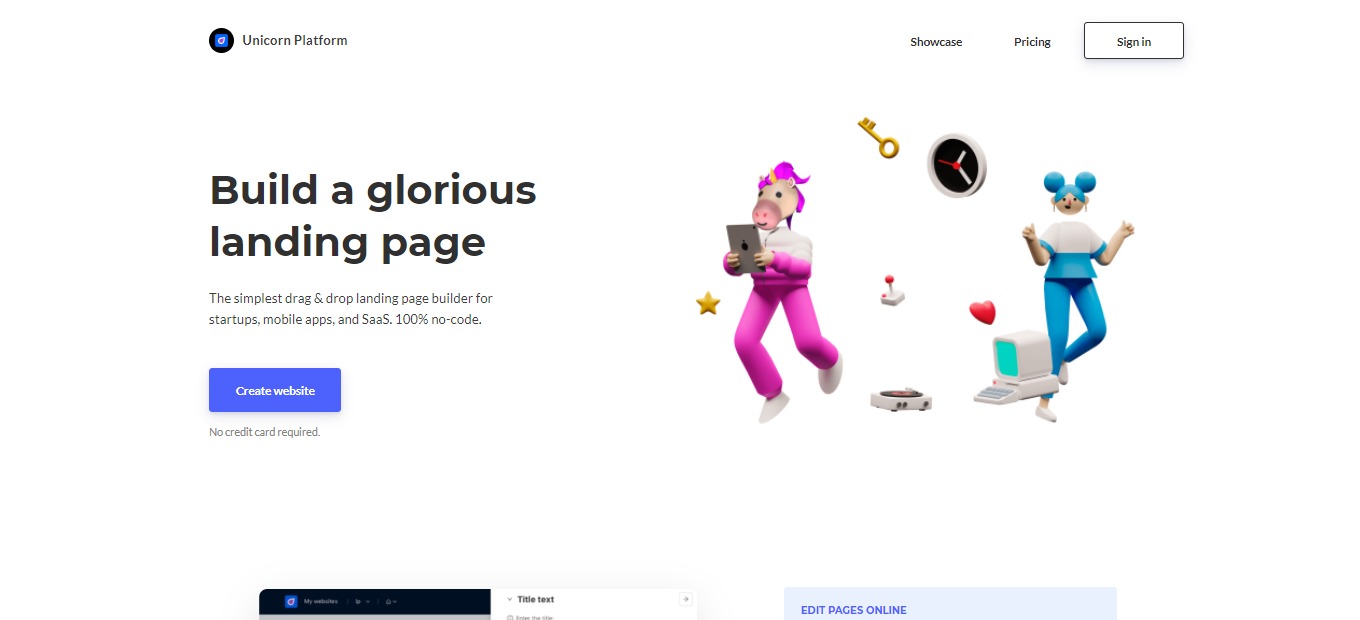
The bread and butter of Unicorn Platform is its simplicity and ease of use. It offers a simple drag and drop feature that allows you to create a landing page without coding. With the customization features, Unicorn Platform allows you to change color palettes, fonts, button styles, and backgrounds. It also lets you change texts, images, buttons, and forms through the online editor. 

Aside from the editor, this app also has templates that can help you jump-start your website. Unicorn Platform saves you time by providing readily available integrations for collecting emails and leads. Take advantage of the safe and easy Stripe Checkout integration and accept one-time purchases as well as recurring payments.Β 

This app also allows you to add your own code and embed it in the website you are creating. With Unicorn Platform, you can also export any site as the HTML version. After creating your landing page, Unicorn Platform allows you to publish it on a custom domain by clicking a single button. 

πŸ–₯️ How Does It Work?

  1. Click the β€˜Create new website’ button then add a subdomain.
  1. Click β€˜Edit website pages’ and you will be redirected to the pages of your website. You can individually edit, add, or remove a page.
  1. Click β€˜Edit page’ and browse through the components collection. Then, select the main page that you prefer. Customize the page and click β€˜save changes’.
  1. You can add more components from the collection. 
  1. Edit specifications of the component that you have selected.
  1. Publish the page to see how it looks like in public. 

πŸ’² Pricing Plans & Support

Unicorn Platform offers affordable pricing for everyone!

πŸ’Ž Lurker – Free

Have a try on the landing page builder for free!

〰️ Custom code

γ€° ️1 published website

〰️ 10 blog posts

πŸ’Ž Maker – $8/Month

For aspiring makers, this plan is only $8 per month!

〰️ Custom code

〰️ Custom domain

γ€° ️1 published website

〰️ 10 blog posts

〰️ HTML export

πŸ’Ž Startup – $18/month

This plan for serious projects that need a reliable website is only $18 per month!

〰️ Custom domain

〰️ Custom code

〰️ 1 published website

〰️ HTML export

〰️ Remove Unicorn branding

〰️ Unlimited blog posts

〰️ 1 collaborator

πŸ’Ž Business – $28/month

This plan for many projects that need a nice website is only $28 per month!

〰️ Custom domain

〰️ Custom code

〰️ 3 published website

〰️ HTML export

〰️ Remove Unicorn branding

〰️ Unlimited blog posts

〰️ Unlimited collaborators

πŸ“ The Competition

πŸ‘ ProsπŸ‘Ž Cons
πŸ‘ Platform for creatives that love to design websites
πŸ‘ Good design tools and templates
πŸ‘ Accessible to anyone
πŸ‘Ž Bad customer service
πŸ‘Ž Lags and crashes

Get a simple drag & drop landing page builder with Unicorn Platform 4.0!

Milanote: The Notes App for Creative Work

 βš–️ Our Verdict

Milanote is recommended for everyone, whether if it is for business use or personal use, this app has got you covered. With all of the features on this app, it could be of great help with your research, thinking, planning, and collaborating. All of these can be done smoothly with the use of Milanote.

It is said that Milanote is the Evernote for creatives. That is why many creative professionals from different companies use Milanote. This is a definitely interesting app for creatives, but still has some room for improvement. The customer support is great, and the creators listen to its users.

In summary, this app is essential, filled with features, and an affordable application for your note-taking needs.

πŸ‘ ProsπŸ‘Ž Cons
πŸ‘ Essential design organizational tool
πŸ‘ Elegant and simple interface
πŸ‘ Flexible
πŸ‘ Many features
πŸ‘ Available on all devices
πŸ‘ Collaboration features
πŸ‘Ž Has a learning curve
πŸ‘Ž Occasional bugs
πŸ‘Ž Limited features in free version
πŸ‘Ž Online use only
πŸ‘Ž Need to sign up

🌟 About Milanote

Milanote is a web application for organizing your ideas and projects into visual boards. This application is a notes app for creatives. Milanote is more visual, tactile, and flexible than similar products as it tries to recreate the feeling of working on a wall in a creative studio.

This application is designed for visual people and it has a lot of features. It works well for notes and pictures related to design. When this app was first released, it was only available for web use. It is now available on desktop and mobile devices.Β 

Milanote is a flexible, creative workstation, which means it may be used in a variety of ways. Milanote is the place to begin your creative work, from brainstorming and designing mood boards to monitoring your activities.

🎁 What’s In It For You?

Milanote allows you to become organized without sacrificing your creativity. With this app, you can collect everything in one place. Milanote lets you write notes and to-do lists, upload images and files, save text, images, and links from the web, and add notes and photos from your phone. 

With the flexible drag and drop interface, Milanote allows you to arrange things in what suits your project best. This app is not only for individual use, but it also lets you collaborate and share with your team. Milanote can be a private place to think or a shared platform for collaboration. You can edit with your team in real-time and share the result of your boards.

The best thing about this app is its flexibility as it can help you with whatever you need.

πŸ–₯️ How Does It Work?

  1. Drag out a board from the left sidebar then name it. Double click to open it.
  1. Drag out a note and start typing ideas for the project. You can type as many as you want.
  1. Group the ideas by using the column button. Drag the column from the sidebar then put the text inside the column.
  1. Drag and drop images directly from the desktop. Click the photo and add some captions.
  1. Add a new board then drag the images inside to group them together.
  1. Add a checklist from the left sidebar.
  1. You may add lines to explain your project further. 
  1. Click the share button beside the title of your board to invite others to collaborate. 

πŸ’² Pricing Plans & Support

Milanote has very simple pricing for a great product!

πŸ’Ž Free – $0/Month

This essential deal is free!

〰️ 100 notes, images, or links

γ€° ️10 file uploads

〰️ Unlimited shared boards

πŸ’Ž Individual – $9.99/Month

This essential deal is only $9.99 per month

〰️ Unlimited notes, images, or links

γ€° Unlimited file uploads

γ€° Unlimited shared boards

πŸ’Ž Team – $49/month

This essential deal is only $49 per month for up to 10 people!

〰️ Unlimited notes, images, or links

γ€° Unlimited file uploads

γ€° Unlimited shared boards

γ€° Priority support

πŸ“ The Competition

πŸ‘ ProsπŸ‘Ž Cons
πŸ‘ Good collaborative experience
πŸ‘ Amazing templates
πŸ‘ Multiple functions
πŸ‘Ž Technical to use
πŸ‘Ž Some bugs

Get a notes app for your creative work with Milanote.

For developers specifically: Milanote is built for visual, creative planning. If your notes are mostly code snippets and runbooks that need syntax highlighting and offline files, Boostnote is the closer fit.

Pixlr: Edit Images and Create Quick Designs with AI Tools

βš–οΈ Our Verdict

Pixlr is one of the best alternatives to Photoshop as it is free and accessible. It can be used by professional graphic designers and also beginners. For a web application, Pixlr is one powerful editing software.

With the many advanced features, Pixlr is amazingly easy to use, especially if you have experience in using photo editing software. Pixlr might not replace the best editing software around, but for newbies or instant photo editing, this is an essential application.

What is amazing about this app is that it has a free version! You might encounter ads, but it is all worth it. The upgrade plans are also worth the money. Overall, Pixlr is easy to use, all-in-one, and an affordable application for your photo editing needs.

πŸ‘ ProsπŸ‘Ž Cons
πŸ‘ Suitable for daily photo editing
πŸ‘ Saves time and money
πŸ‘ Accessible on browser
πŸ‘ Many templates
πŸ‘ Has free version
πŸ‘Ž Lacks some professional features
πŸ‘Ž Interface gets changed frequently
πŸ‘Ž Shows ads in the free version

🌟 About Pixlr

Pixlr is an online photo editor that allows you to edit pictures and create great designs in the comfort of your browser. It features advanced, intuitive editing and designing with powerful tools for an instant but professional-looking edits.

This application is packed with a lot of advanced features, making it a powerful browser editing tool. Pixlr has two different versions namely Pixlr E and Pixlr X. The difference between these two versions is the functionality and ease of use. 

This application was created to enable everyone to create, edit, and share pictures with ease. Pixlr is part of the INMAGINE creative ecosystem with a mission to make design easy and accessible to everyone.

🎁 What’s In It For You?

Pixlr allows you to optimize its two versions that are both powered by AI. This app can help you with your online image editing needs as it is readily accessible on a browser. Pixlr X is best used for instant and simple editing. It is easy to use and offers amazing templates. Pixlr X lets you use modern photo editing tools for quick edits. It allows you to open most image file types, create collages, and add artistic effects.

On the other hand, Pixlr E is a more advanced version. It allows you to utilize powerful and advanced photo editing tools. Pixlr E has professional features that graphic designers are familiar with. It has selection tools and allows you to cut, copy and paste it. This version also lets you use to fill and gradient tools, sponge/color tool, advanced color picker, more filters, and many more tools!

Another amazing feature of Pixlr is the background remover by Pixlr AI. It allows you to remove background from multiple pictures and create transparent photos. Aside from the browser application, Pixlr also lets you download and install the desktop editing app, both available in Windows and Apple if you are an exclusive subscriber of Pixlr. 

πŸ–₯️ How Does It Work?

  1. To use the background remover, click on the β€˜Remove BG’ button, then drag and drop the image you want to use.
  1. Using Pixlr X, open an image or load from a URL by clicking the buttons on the left side of the interface.  You can also drag and drop an image.
  1. The editing tools are located on the left side of the screen. Hovering over them will reveal the name of the tool.
  1. Add images from stock.
  1. Save in multiple formats. PXZ format allows you to save your progress and return to editing.

πŸ’² Pricing Plans & Support

Edit smarter, faster, and easier with the different plans of Pixlr! 

πŸ’Ž Free – $0/Month

This amazing and helpful deal is for free!

〰️ Access to Pixlr X and E

〰️ Basic editing tools

〰️ Limited set of overlays

〰️ Limited set of stickers

〰️ Supported by Ads

πŸ’Ž Premium – $4.90/Month

This amazing and helpful deal is only $4.90 per month!

〰️ Pay Yearly and Save 38%

〰️ Full Access to Pixlr X and E

〰️ Extensive editing tools

〰️ AI CutOut (and future AI tools)

〰️ 3,000 extra overlays

〰️ 7,000 extra icons/stickers

〰️ 5,000 decorative texts

〰️ 18,000 Assets 

〰️ Templates 

〰️ Supports a maximum of 8196 x 8196 image resolution 

〰️ Exclusive video tutorials

〰️ Ad free!

〰️ Download for Apple and Windows

πŸ’Ž Creative Pack – $14.99/month

This amazing and helpful deal is only $14.99 per month!

〰️ Pay Yearly and Save 50%

〰️ Unlimited Access to Stock Content – 10 million Graphics, Templates, Fonts, Photos, Video & 3D files.

〰️ Full Access to Pixlr X and E

〰️ Extensive editing tools

〰️ AI CutOut (and future AI tools)

〰️ 28,000 extra overlays

〰️ 7,000 extra icons/stickers

〰️ 5,000 decorative texts

〰️ 18,000 Assets 

〰️ Templates 

〰️ Supports a maximum of 8196 x 8196 image resolution 

〰️ Legal guarantee of $25,000

〰️ Exclusive video tutorials

〰️ 24/7 Premium Support

〰️ Ad free!

〰️ Download for Apple and Windows

πŸ“ The Competition

πŸ‘ ProsπŸ‘Ž Cons
πŸ‘ User-friendly
πŸ‘ Many templates and graphics
πŸ‘ Has free version
πŸ‘ Collaboration features
πŸ‘Ž Some tools and images are not free
πŸ‘Ž Limited photo editing functions

Edit images and create quick designs with AI tools with Pixlr.

Zorbi: Make Spaced Repetition Flashcards from Notion or Chrome

βš–οΈ Our Verdict

Zorbi should be used by every student that is struggling in studying. It is guaranteed to help you since the framework within this app is backed by science. With this app, you can ace your exams with the most efficient way to study!

Zorbi makes studying easy and fun since it has gamification elements. You can quickly use it and create flashcards for yourself and your friends. It has a great UI and is intuitive to use. Also, with the chrome extension, you can save time by creating a flashcard while studying on a pdf or website. This application is essential for any student!Β 

Zorbi is also a great alternative to other flashcard applications. It has a better UI, is easier to understand, has lots of integrations, and most importantly, it is for free, as every learning application should be!

πŸ‘ ProsπŸ‘Ž Cons
πŸ‘ Good user interface
πŸ‘ Free application
πŸ‘ Backed by science
πŸ‘ Integrations
πŸ‘ Collaboration features
πŸ‘ Good community and customer support
πŸ‘ Has extension
πŸ‘Ž No image occlusion
πŸ‘Ž Limited customization features
πŸ‘Ž No offline mode
πŸ‘Ž No iOS app

🌟 About Zorbi

Zorbi is a tool for learning that uses flashcards to help you study. It utilizes the most effective way to learn and is backed by science; the active recall and spaced repetition methods. Most flashcard apps that use spaced repetition are difficult to use. Then, Zorbi was created to prevent problems within this field and increase the usage of effective learning techniques.

This app was originally made by students so it addresses the needs of other students. The learning techniques behind Zorbi are the effective ones that were used by the creator. Zorbi puts into practice the most effective learning methods for you!

🎁 What’s In It For You?

Zorbi allows you to instantly create and customize flashcards even while studying since it has a chrome extension. After creating cards, this app lets you organize the content into more structured and flexible topics for better learning. 

Zorbi can be downloaded via Google Play Store and Chrome Web Store for more efficient studying. This app allows you to strengthen your memory recall by answering questions. The rating feature also determines when you will forget the question and apply certain measures to remedy that problem. 

With Zorbi, you can also collaborate on flashcards with your friends while writing notes on Notion. This integration allows you to turn them into ready-made flashcards on your Zorbi which you can also share with anyone. 

Lastly, if you do not want to create your flashcards, Zorbi has a high-quality and curated list of flashcards. Now you can absorb knowledge more efficiently while saving time. 

πŸ–₯️ How Does It Work?

  1. Click β€œNew deck”. Then, fill up the necessary information as well as the color of your deck.
  1. Add a flashcard through the Zorbi app or by using the chrome extension. Fill up the information that you need, then click β€œadd card”.
  1. On the Zorbi app, click on a specific deck to see the overview of the cards.
  1. Click the review button to go over the flashcards daily or as scheduled.
  1. After finishing the review, you cannot repeat it unless you wait for the due date or reset the scheduling. 

πŸ’² Pricing Plans & Support

With all of the amazing and helpful features of Zorbi, it is unbelievable that this app is for free! Zorbi currently offers everything for free. Since it is a newly launched application, the creators are exploring other monetization options that will let them keep the base app free forever.Β 

πŸ“ The Competition

πŸ‘ ProsπŸ‘Ž Cons
πŸ‘ Easily and quickly make flashcards
πŸ‘ Multiple ways to study flashcards
πŸ‘ Available in desktop or mobile
πŸ‘Ž Prompts to upgrade membership
πŸ‘Ž Changes in format
πŸ‘Ž Has ads

Make spaced repetition flashcards from Notion or Chrome with Zorbi

Hyperbeam: A Better Way to Watch Together Online

βš–οΈ Our Verdict

Hyperbeam is recommended for everyone that loves watch parties. This app offers a better way to watch together online as it allows you and other people to share the same browser. Since the pandemic hit, online watch parties have been a thing, with Hyperbeam, you can now enjoy hanging out with other people more, even when you’re physically apart. 

You are not only limited to watching movies on this app because you can also browse any website you can think of and share the browser with anyone! As amazing as it gets, this application has a built-in chat, audio, and video call. The customer service of this app is also superb just like the app itself!

Hyperbeam is free to use with an available premium plan upgrade. Overall, it is intuitive to use, fun, and an essential application for connecting with other people!

πŸ‘ ProsπŸ‘Ž Cons
πŸ‘ Shared browsing
πŸ‘ Good organization for the servers
πŸ‘ Good quality 
πŸ‘ Good customer service
πŸ‘ Free options
πŸ‘ Integrated chat and video call
πŸ‘ Downloadable app in desktop or mobile
πŸ‘Ž Website lag
πŸ‘Ž Has bugs
πŸ‘Ž Crashes
πŸ‘Ž Need to sign up
πŸ‘Ž Free account has a 3-hour browsing limit

🌟 About Hyperbeam

Hyperbeam is a web app for shared browsing that allows you to surf the web, listen, or watch together with anyone online. Hyperbeam helps you to stay close with anyone, even apart. It also helps you nurture your relationship with friends, family, and romantic partners.

Users can bring any friends to their room and take turns in controlling a shared virtual browser. This feature allows them to visit any website they want together. Hyperbeam uses an innovative technology called shared browsing results in a considerably better watch party experiences than screen sharing or video sync apps.

Hyperbeam was started as an engineering project and is now used by 150k monthly users and counting!

🎁 What’s In It For You?

The bread and butter of this app is the shared web-browsing feature. You can invite friends and surf the web together. It lets you browse and share control with friends. This app’s shared browser is synchronized but designed to be simple and easy to use. Hyperbeam allows you to easily enjoy time with anyone whether you are on your phone, laptop, or tablet. 

Hyperbeam is also equipped with everything you need! It lets you express yourself better with the features such as voice and video calls, GIFs, emojis, and many more! This allows you to have a better watch party experience.

πŸ–₯️ How Does It Work?

  1. Click the “Add Room” button at the top-right corner of the interface.
  1. Add a name and a picture to your room then click β€œCreate”.
  1. Generate an invite link by the green + button.
  1. Send the link to your friends and they will see the invitation page with your room name and picture.
  1. All of your active friends are shown below. The profile with the cursor is the one controlling the browser.
  1. Click the β€œRequest Control” button to request control or click your profile picture in the hub. Transfer control by clicking the profile picture of your friend on the hub.
  1. Click the trust mode if you want to let people take control without approval.

πŸ’² Pricing Plans & Support

The pricing plans for Hyperbeam are simple and straightforward. This app is originally for free and has a premium plan if you wish to access more features such as custom URLs, ultra bitrate, and more!

πŸ’Ž Freemium – $0/Month

This amazing plan is free for life!

〰️ 3 hours limit for browsing and 10-minute waiting time

γ€° ️Shared web browsing

〰️ Text, voice, and video chat

〰️ All the other features!

πŸ’Ž Premium – $4.99/month

This amazing plan is only $4.99 per month!

〰️ Unlimited session length

〰️ Everything at free

〰️ Animated profile pictures

〰️ Custom invite links

〰️ Ultra bitrate

πŸ“ The Competition

πŸ‘ ProsπŸ‘Ž Cons
πŸ‘ Shared browsing
πŸ‘ Public rooms
πŸ‘ Integrated chat and call
πŸ‘Ž Privacy issues
πŸ‘Ž 8 people maximum
πŸ‘Ž Lag and bugs

Watch together online with Hyperbeam

Ludus 1.0: Collaborative Presentations for Creative Teams

βš–οΈ Our Verdict

Using Ludus will solve your problem regarding sharing, compatibility, collaboration, creativity, and much more! It is recommended for everyone to use, especially for creatives and designers. Everyone can use it too but it has a learning curve that is worth the time if you can use it correctly.

This app might be the solution for the problems that our presentation tools have nowadays. It is not restrictive so you can let your imagination run wild and express your creativity. It has a lot of features and we can say that this is a powerful tool for a web application. Using Ludus will cure your boredom and fatigue since you will enjoy using this app.Β 

This presentation tool is affordable, especially for huge teams. As remote work is now a thing, allow Ludus to be your companion in presenting! 

Overall, Ludus is packed with features, affordable, and a powerful application that can serve your presentation needs well.

πŸ‘ ProsπŸ‘Ž Cons
πŸ‘ Live collaboration
πŸ‘ Google drive integration
πŸ‘ Creative templates
πŸ‘ Dark/light modes
πŸ‘ Sophisticated tools
πŸ‘ Many resources i.e. fonts and graphics
πŸ‘ Drag and drop
πŸ‘ Free trial for 30 days
πŸ‘Ž Has bugs
πŸ‘Ž Paid application
πŸ‘Ž Technical to use
πŸ‘Ž Relies on internet

🌟 About Ludus

Ludus is a powerful web presentation tool for creative teams that aspire for sophistication in their creation and collaboration. It combines creativity with simplicity. Ludus is more than a presentation tool since it is also a tool to communicate, collaborate, learn, and play.Β 

It has a lot of features that designers are familiar with. From fonts and graphics to blending modes, this app allows you to create without limitations. With the integrations from Unsplash, GIPHY, Dropbox, Google Drive, etc., you can add anything you want. 

Ludus was created because of the existing presentation tools that do not allow you to collaborate efficiently and limit your creativity. This tool solved the creators’ problems and now helps thousands of teams all over the world. 

🎁 What’s In It For You?

Ludus allows you to work together on a presentation effortlessly. This app finds the right balance between working together and controlling your privacy. It lets you define boundaries for collaboration so you are in full control. With the live collaboration feature, you can fluidify your team’s workflow.

With this app, creatives can put together presentations the same as they could with other creative tools. Ludus makes designers feel at home by the features of the app. The keyboard shortcuts, workflow, and UI, everything feels familiar allowing designers to be productive at a snap.Β 

You can do everything with all types of content; ranging from the crop, corner radius, drop shadow, filters, blend modes, and skew. Ludus also has numerous templates and themes that you can change in one click. The fonts on this app are also limitless as you can upload your preferred font as TTF or OTF.  Ludus also allows you to quickly share, save, and reuse assets across your team and presentations by the smart blocks feature.

Lastly, Ludus lets you present the way you like. Live, remote, or even without you being there. You can record yourself on top of your slides to make them clearer for the audience.

πŸ–₯️ How Does It Work?

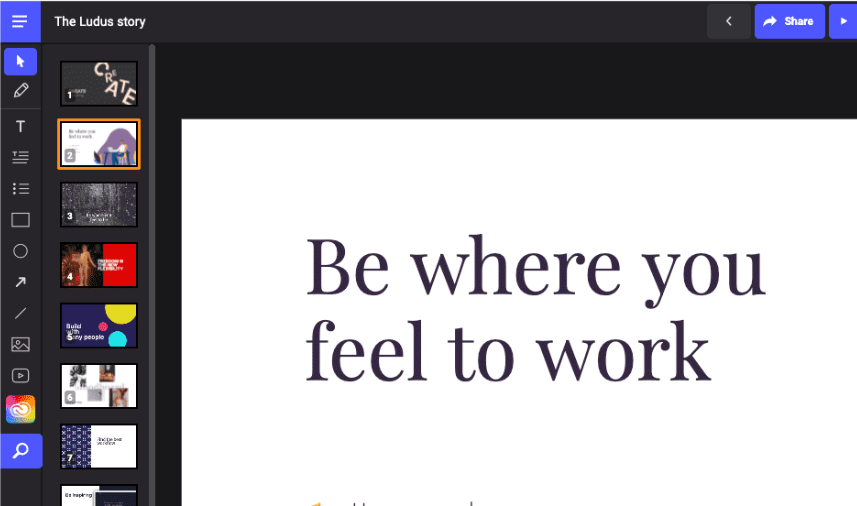
  1. The dashboard shows your presentations with the tags system.
  1. The left navigation shows the basic editing features. You can add texts, shapes, and lines. You can upload images or videos. Here you can also access the code editor and the smart menu.
  1. On the right menu, you can edit the size, position, depth, rotation, fill, gradient, stroke, and opacity of all your objects.
  1. Use keyboard shortcuts to quickly add, duplicate, move, and remove slides on the slide manager.
  1. The smart menu contains everything you need. You may access it with your mouse or your keyboard (tab key). 
  1. You can add graphics by the drag and drop feature. You can also edit the icons the way you like. 

πŸ’² Pricing Plans & Support

Ludus offers unique pricing for all kinds of users! The prices vary according to the number of users and all plans contain all the features. Now you can get what you want!

πŸ’Ž Ludus small – $14.99/Month per user

This deal for 1 to 15 users is only $14.99 per month per user!

〰️ Unlimited team members

γ€° ️Unlimited presentations

〰️ Unlimited storage

〰️ All of the other features

πŸ’Ž Ludus medium – $13.99/Month per user

This deal for 16 to 35 users is only $13.99 per month per user!

〰️ Unlimited team members

γ€° ️Unlimited presentations

〰️ Unlimited storage

〰️ All of the other features

πŸ’Ž Ludus large – $12.99/Month per user

This deal for 36 to 50 users is only $12.99 per month per user!

〰️ Unlimited team members

γ€° ️Unlimited presentations

〰️ Unlimited storage

〰️ All of the other features

πŸ’Ž Ludus corporate – $11.99/Month per user

This deal for 51 users and above is only $11.99 per month per user!

〰️ Unlimited team members

γ€° ️Unlimited presentations

〰️ Unlimited storage

〰️ All of the other features

πŸ“ The Competition

πŸ‘ ProsπŸ‘Ž Cons
πŸ‘ Good templates
πŸ‘ Not restrictive
πŸ‘ Many resources i.e. graphics, photos, icons
πŸ‘ Works fast
πŸ‘ Live collaborationΒ 
πŸ‘Ž Shapes are limited
πŸ‘Ž Has a learning curve

Enjoy collaborative presentations for creative teams with Ludus 1.0!

Neeva: Ad-Free, Private Search

βš–οΈ Our Verdict

Most of our search engines today provide relatively few results and more advertisements. We use search engines every day to help us gain insights. That is why we need search engines that give us direct-to-the-point results without any advertisements and without having to compromise our security. Neeva helps us achieve these things easily. A search engine without ads was once a dream, but now it has become a reality with Neeva. 

Neeva feels more like an application rather than a simple search engine because of its features and integrations. However, the general search results are not as good as Google’s organic results. It has a lot of features including a personal search engine, customization, and etc.

This search engine is essential for people that value their security and time. All in all, Neeva is easy to use, affordable, and a useful search engine for web browsing.

πŸ‘ ProsπŸ‘Ž Cons
πŸ‘ 100% ad-free
πŸ‘ Privacy focused
πŸ‘ Has dark mode
πŸ‘ Has ad blocking extension
πŸ‘ Customization in search results
πŸ‘ Has preview function
πŸ‘ 3 months free trial
πŸ‘Ž Paid applicationΒ 
πŸ‘Ž Results are not as organic as google
πŸ‘Ž Not the best local searches

🌟 About Neeva

Neeva is a newly launched search engine that focuses on privacy. It is subscription-based and 100% ad-free. As traditional search engines work by monetizing and gathering data from their users, a lot of ads show when users are browsing and searching. These search engines cater to their customer which is the advertiser, not you. With Neeva, searching is now reimagined for you.Β 

Ex-Google executives founded Neeva to provide the best search experience for you. No ads and no third-party tracking. This app will not sell your data. Neeva also comes close to Google when it comes to searches but without the ads! With every query using Neeva, it focuses on delivering the best result for you.

🎁 What’s In It For You?

Neeva allows you to experience high-quality results from your searches. It eliminates all the ads that you see when searching for something. This app also provides you with great security as it blocks all the trackers to keep your data safe using a browser extension.

In terms of customization, Neeva also lets you pick the news sources that you trust and retailers you love, allowing you to have a curated search experience. When shopping, Neeva allows you to view the expert-recommended shopping results aggregated in one place. Neeva also lets you search across everything including your personal accounts by syncing your email, calendar, and documents so that you can find everything in one search.Β 

This app also has a feature that allows you to find the recipes you want. The results of recipes are filtered by total cook time, ingredients, and reviews right from your search results. 

πŸ–₯️ How Does It Work?

  1. Type on the search bar like a normal search engine. Click the content then the preview will show on the right side of the screen.
  1. You can filter down the results by clicking on the preferred type of document below the search bar. 
  1. You can customize your news feed with the preferred providers feature. Go to the home page then click on the customize on the news feed. After customizing, reload the page. 
  1. When visiting other sites, the Neeva extension helps you block trackers and protect your privacy. Click on the extension to view specific trackers and the total number.
  1. Click on the personal tab to filter by all of your personal results. 
  1. Click on the apps section to connect your apps to the search engine. 

πŸ’² Pricing Plans & Support

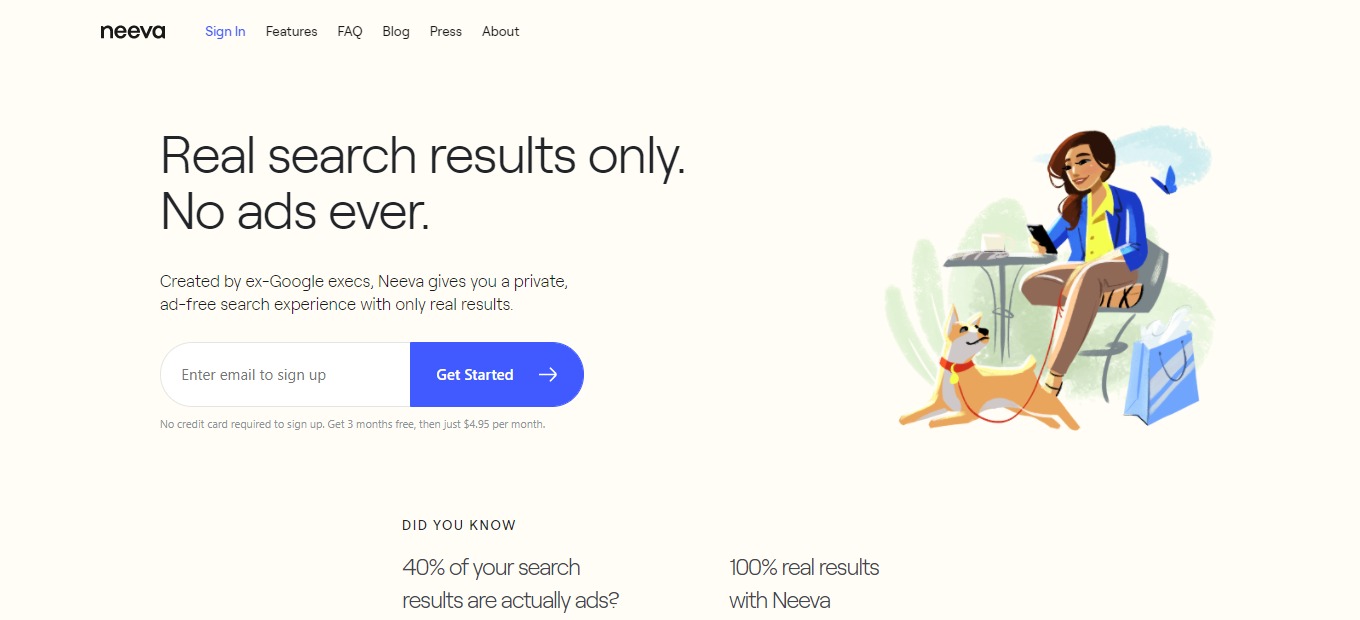
Neeva offers very simple pricing that is worth your money! Neeva is free for your first 3 months and also does not require a credit card to sign up. After the first 3 months, the monthly price for this app is only $4.95.

πŸ“ The Competition

πŸ‘ ProsπŸ‘Ž Cons
πŸ‘ Free app
πŸ‘ Protects user privacy
πŸ‘ No ad tracking
πŸ‘ Wide spectrum of instant answers
πŸ‘ Infinite scrolling page
πŸ‘ Customization features
πŸ‘Ž No date information in results
πŸ‘Ž Search results not accurate
πŸ‘Ž Uses bing for query
πŸ‘Ž Has ads

Get ad-free, private search with Neeva

Tilde: Free, instant meeting rooms for all your collaborative needs

βš–οΈ Our Verdict

Tilde is a must for everyone working remotely! It is one of the easiest-to-use video-conferencing applications out there. It saves you time and effort, preventing you from experiencing fatigue from online sessions. It has multiple features that other bland apps do not have. From instant creation of meetings to a built-in whiteboard, and many more, this application is packed with all the goodness! 

This application is a convenient and refreshing take on online meetings, making it a great tool for your remote needs. It promotes the engagement of its users because of the features and the creative design. What’s more amazing is that Tilde is a free app! 

This app can be used by students, organizations, professionals, and etcetera because of its versatility. To sum it all up, Tilde is easy to use, efficient, and a necessity for your online meeting needs.

πŸ‘ ProsπŸ‘Ž Cons
πŸ‘ Multiple templates 
πŸ‘ Free app
πŸ‘ No sign up needed
πŸ‘ Instant meetings
πŸ‘ Collaborative notes
πŸ‘ Screensharing and file sharing
πŸ‘Ž Few integrations
πŸ‘Ž Limited customization features
πŸ‘Ž Meetings cannot be recorded
πŸ‘Ž Room limited to 20 people

🌟 About Tilde

Tilde is a video conferencing software that makes meetings a lot more structured, efficient, and inclusive for all. Tilde’s meeting rooms are free and instantly accessible thus, it is energy-saving to use. This app is an interactive meeting space where anyone can create a virtual room with lots of features!

Tilde was created due to the reason that virtual meetings are drawing out the energy in us, staring at each other every day through boring boxes. Considering the significance of virtual meetings for remote teams, Tilde’s team believes that there should be a better option. That is why they built a great virtual meeting tool.

🎁 What’s In It For You?

Tilde lets you create an instant meeting for your collaborative needs for free, without having to sign up. No need to switch between apps or tabs because this app allows you to capture ideas directly from a meeting through several features like collaborative notes, whiteboard, screen sharing, and file sharing. The meeting’s contents get saved even after the meeting has ended, so you can go back to the link and return to where you left off.

This is a hassle-free video conferencing software as there is no need to sign up for an account to create or join a meeting. Simply click create, share the link, and let your participants join the meeting with a single click! Tilde also offers different meeting templates for different purposes such as daily stand-up, weekly sync-up, one-on-one, happy hour, and many more!

This application offers more than just a video call. Multiple participants can share their screens simultaneously! Tilde also allows you to create breakout rooms smoothly. Tilde indeed offers everyone a delightful space to have a meeting!

πŸ–₯️ How Does It Work?

  1. Click create an instant meeting.
  1. Choose an appropriate template for your meeting.
  1. Copy the link then send it to other participants.
  1. Drag your avatar to move wherever you want. You can also move the contents on the screen by dragging them on the top.
  1. At the bottom bar, you can add other content such as links, sticky notes, whiteboard, youtube videos, collaborative notepad, files, and a breakout room called a huddle.

πŸ’² Pricing Plans & Support

Tilde is a free application at the moment. You can enjoy all of its amazing features without having to pay!

πŸ“ The Competition

πŸ‘ ProsπŸ‘Ž Cons
πŸ‘ Fun and easy to use
πŸ‘ More interactive features
πŸ‘ Free app
πŸ‘ Great UI
πŸ‘ No installation needed
πŸ‘Ž Inappropriate for formal meetings
πŸ‘Ž Meetings cannot be recorded
πŸ‘Ž Supports only 20 participants with video, 100 participants in total during a session.
πŸ‘Ž Need to sign up to host a meeting

Get free, instant meeting rooms for all your collaborative needs with Tilde