Headroom 2.0: Hands-free meetings with real-time AI video conferencing

⚖️ Our Verdict

Headroom is an online video conferencing tool like no other! This is the solution to Zoom fatigue that we are experiencing nowadays. Sitting in meetings makes you miss a lot, mainly because online sessions are fast-paced. Because of that, you miss essential information, and you cannot digest the information regarding the meeting properly.

Headroom is a new way to collaborate, meet, and make the most of our time. Artificial Intelligence allows users to utilize online meetings and spend more time on the discussions themselves. This application is best used by everyone. Be it, students or professionals, Headroom might be the solution to online conferencing problems.

The AI technology lets you have access to live transcripts that can also be discussed on the shared team notes. The best thing about Headroom is that you can search for the details of the meeting, saving you time and effort – All of that for free! This might be the following biggest online conferencing tool out there.

In summary, Headroom is an intuitive, accessible, and essential application for your online meeting needs. 

👍 Pros👎 Cons
👍 Free application
👍 High quality video in low bandwidth
👍 AI powered
👍 Automatic summaries
👍 Live transcripts and shared notes
👎 Works best only on Chrome browser
👎 In beta

🌟 About Headroom

Headroom is an online video conferencing tool on a web browser. This application empowers people to think creatively, form relationships, and solve problems while letting Artificial Intelligence do the rest. This actually makes you a better participant. 

It uses AI tools that include computer vision, natural language processing, and more. Not only does it provide room for video conferences, but it also provides summaries, transcripts, gesture recognition, high video quality, and more. 

Headroom was founded because the creators thought of taking AI technology and sharing it with people that would make their lives easy. Now you can enjoy hands-free meetings and concentrate on the discussion! 

🎁 What’s In It For You?

Headroom allows you to act naturally by utilizing AI for you. The AI will recognize hand gestures, and you can give feedback without clicking anything. The gestures that the AI can recognize include thumbs up, thumbs down, wave, facepalm, and more to come.

Headroom saves you time and energy by automatically transcribing your meeting. You can use the text generated from the transcript to the shared team notes. This can clarify miscommunications without disrupting the flow of the meeting. Headroom also lets you have meeting replays that can be skipped, highlighted, and sped up. 

Aside from that, Headroom also generates summaries of your meetings, making them easier to digest. You can share it with the participants to recap the meeting without any effort. You can also search sessions by little things you remember, like attendees, notes, topics, words, and others. 

Even without downloads, Headroom lets you utilize high-quality videos without taking much of the bandwidth. The best part about all of this is that this application is entirely free!

🖥️ How Does It Work?

  1. Click the ‘New meeting’ button on the right panel.
  1. Fill in the necessary details of your meeting. You can add participants by name or email, and they will be notified through email.
  1. Edit the settings for the post-meeting access.
  1. After creating, the meeting will show up on your dashboard. Click on it, then join the meeting.
  1. You will be redirected to the meeting. You may turn on or off your camera and mic prior to joining. You can also set your virtual background.
  1. The buttons below the screen let you control the settings of the meeting. You can also access here the shared team notes.
  1. Click on the bottom right corner of the screen to access the automatic transcription. Click on a text, and it will be copied on the shared team notes.
  1. Leaving the meeting will let you access the post-meeting summary. You can view the shared team notes, the meeting replay, and the transcript. The post-meeting also shows the total wordshare of each participant.

💲 Pricing Plans & Support

With all of the fantastic features of Headroom, this application is totally free! This application has secured $5 million as it prepares to release its freemium service into the world. That way, you can enjoy all of the amazing features without worrying about breaking the bank!

📍 The Competition

👍 Pros👎 Cons
👍 File transfer
👍 Live transcription
👍 Versatile video conferencing tool
👎 Uncomfortable GUI
👎 Similar to Zoom

Hands free meetings with real-time AI video conferencing with Headroom 2.0

Nitro: Fast, professional translations by native speakers, open API

⚖️ Our Verdict

Nitro is one of the best authentic translation services in the market. It is backed by professional and native speakers of different languages and the translations are reviewed for best quality. This application is very simple and intuitive to use. You just need to paste a text and select some options then the price will be revealed. However, it does not accept any file types for translating as of now. 

Nitro is a pay-as-you-go service without additional fees. It has multiple languages and the translators have a piece of wide knowledge on different subjects. Nitro can be used for translating in different industries from Web development, and sciences, to even personal uses like love letters!

Overall, it’s an intuitive, simple, and quality application for translating texts for different uses.

👍 Pros👎 Cons
👍 Fast and authentic translation
👍 Translation by professional, native-speaking linguists
👍 Convenient purchase options
👍 Many languages
👍 Affordable
👎 Some languages need multiple translation for end result
👎 Paid service
👎 Cannot add comments to specific parts
👎 Lacks some functions
👎 Not the best UI
👎 Text only, does not accept files

🌟 About Nitro

Nitro is an online live translation service that is automated without sacrificing quality. This application is a platform from Alconost, a company that has been working in the localization and translation industry for over 15 years. The principle behind Nitro is simple. You put a text and it is sent to professional native-speaking translators. The ready-made translations will be sent to your email once it is done. All of this works by utilizing API. 

This application is great for translating many texts. Nitro was created so that people can authentically translate texts fast and easily. This makes product translation faster and easier than ever before! The problem of needing to find a translation service weekly can be solved by Nitro.

Nitro is backed by translators, engineers, developers, and managers. Most translations can be delivered within two hours. Now you can gain access to accurate translation within hours!

🎁 What’s In It For You?

Nitro allows you to translate your text into more than 70 languages that are constantly being added on. This application utilizes human translations exclusively done by professionals and native speakers. There are no limits so you can translate any text that you like within a wide area of discipline. Also, Nitro can even translate as little as 1 word, so there are no minimum orders. 

Nitro lets you chat online with a help-desk operator. You can also leave explanations, comments, and images to provide context for the translator. The domains of translation under Nitro include software and web development, mobile apps, science, e-commerce, marketing, crypto, personal, and etc. 

The quality of the translation is excellent, and you can also influence the quality by providing the necessary information. Nitro does not only provide translation services but also proofreading. Expect to have a high-quality and fast translation that can be completed within a few clicks.

🖥️ How Does It Work?

  1. On the source text, paste or type in the text that needs to be translated.
  1. You can add comments, explanations, images, and other instructions to help your translation to be better. 
  1. Specify the language of the source text.
  1. Select the language to be translated. You may click more than 1 and the price will be adjusted accordingly.
  1. Once done, click on the “send for translation”.

💲 Pricing Plans & Support

Nitro offers a very simple pricing system that varies within the languages selected. The price is also affected by the length of your text. Payment options available on Nitro are credit/debit card, wire transfer, PayPal, Yandex.Money, and Webmoney.

📍 The Competition

👍 Pros👎 Cons
👍 Fast and authentic translation
👍 Can request edits
👎 Limited file types accepted
👎 Paid service and is expensive
👎 Inaccurate translations
👎 UI is average

Get a fast, professional translations by native speakers with Nitro

mymind: A Private Place for Everything You Care About

⚖️ Our Verdict

Mymind is made for busy people. It automatically organizes your thoughts for you and you don’t need to be bothered with folders, systems, and labels. This is an extension of the minds of thinkers and doers.

Other note-taking programs require lots of manual structuring and organizing to be able to find things. But with mymind, the AI automatically tags your content. The AI works very well and is very accurate compared to other products in the market. Also, the search feature is exceptional and very fast.

This app is best for designers, writers, researchers, developers, and anyone that has visual minds. However, it depends on your preference, whether you like a complex system with elaborate hierarchies, or just simply adding all the content in one place. 

Overall, it’s efficient, easy to use, and an essential application for visually taking notes.

👍 Pros👎 Cons
👍 AI and machine learning
👍 Easily search contents
👍 No need to categorize
👍 Has web extension and mobile app
👍 No ads
👍 Privacy-focused
👍 Drag and drop
👎 Paid application 
👎 Limited to 100 cards on free trial
👎 No structure

🌟 About mymind

Mymind is a web application for productivity that lets you save anything from the internet. It is a place for everything that you think of and find; be it notes, bookmarks, inspiration, images, and articles, all in one private place that is enhanced with artificial intelligence. 

An application that stores all the information that is crucial for you should be completely private. That is why mymind is focused on privacy. This application is for your eyes only and goes the extra mile in protecting the data that you store as well as the integrity of your mind. 

This company is run by an independent team, without stakeholders and investors that can potentially distract mymind’s vision. In mymind, the ultimate question is why not. It is a different way to save, remove clutter, and a better application for productivity. 

🎁 What’s In It For You?

Mymind allows you to save everything that you care about in one private place. This application focuses on privacy and is completely independent. Mymind also does not track your activity and does not use ads. This way, your mind can have a place that you can trust.

This application lets you save and find notes quickly. As most of our notes are quick ideas and reminders, mymind allows you to store little pieces of information without hassle. A unique way of saving things, mymind does not utilize folders and categories to save your time. It uses AI and machine learning to help you remember things easily. 

Mymind employs associative searching just like how minds work. One search of the first thing that comes to your mind will lead you to what you are looking for. Images and articles are automatically analyzed and saved with tags and concepts so you can easily search for them. No need for you to waste your time tagging and categorizing. 

It offers frictionless note-taking for short notes without distraction, and a knowledge graph that connects and links the ideas whether you do it yourself or let the app do it. Another amazing feature of mymind is the optical character recognition for images and smart bookmarking that saves a URL the way you want to view it. 

🖥️ How Does It Work?

  1. Add the mymind extension to your browser.
  1. You can drag and drop directly from your computer.
  1. The grid is automatically organized. You can adjust it according to your preference in the bottom left corner of the screen.
  1. Search for any content by typing anything that comes to your mind. You can also search for a specific file type.
  1. When you click a picture, it automatically provides the color codes as well as the mind tags. Hover over the codes and click it to copy. You can change the file name as well as add tags on the content.
  1. Save links by clicking the mymind extension.

💲 Pricing Plans & Support

This amazing application offers a single pricing plan that covers all your needs!

💎 Mastermind – $119/Year

This helpful and essential deal is only $119 per year!

〰️ Capture your ideas & notes

〰 ️Intelligent Bookmarks

〰️ AI Image Tagging

〰️ Text Clippings

〰️ Image Text Recognition

〰️ Advanced Image Search

〰️ Article Analyzer

〰️ Night Mode

📍 The Competition

👍 Pros👎 Cons
👍 Good UI
👍 Relate content with each other
👍 Cheaper
👍 Different view modes
👎 Could be faster
👎 Learning curve
👎 Limited features on free version

Get A Private Place for Everything You Care About with mymind.

Jotform Apps: Create Powerful Apps With No Code

⚖️ Our Verdict

Jotform makes it easy to collect and manage information. This application is an extremely capable builder that has a lot of features to like. Whether a small business, nonprofit, work, or healthcare, Jotform is a good application to use. Considering how simple it is to navigate and use the app, especially the no-code feature, it is indeed powerful.

This application is popularly used to create any type of form. Jotform, with its variety of templates and drag-and-drop builder, is one of the best form builders for customized applications. However, the customer service of Jotform does not live up to the expectations.

Overall, this application is flexible, affordable, and easy to use for creating forms that suit your needs.

👍 Pros👎 Cons
👍 Easy to use
👍 Many templates and integrations
👍 Drag and drop feature
👍 No coding needed
👍 Good user interface
👎 Bad support
👎 Limited features on free plan
👎 Screen fit on different device is not flexible

🌟 About Jotform

Jotform is an app builder that utilizes a drag and drop function without coding. With Jotform’s free no-code application builder, you can combine forms, links, widgets, and your branding in to a single completely customizable app that can be downloaded onto any smartphone, tablet, or computer.

Trusted by many organizations and professionals around the world, this application’s form builder is the easiest way to create and publish any forms from all devices. This application also offers 10,000+ ready-made templates, 100+ integrations, and advanced designs that are easy to create. 

Jotform prioritizes the ease of use and collaboration, thus making it a powerful yet simple builder. 

🎁 What’s In It For You?

Jotform allows you to create an app without coding. This application lets you share multiple links, forms, and other elements in one single application. Also, Jotform works on any device, allowing you to gather data instantly.

The best feature of this app is the drag and drop builder. This intuitive app builder enables you to create apps within seconds. Jotform also has 210+ different app templates, or if you wish to start from scratch, you can build a custom-made app with no coding. This application additionally offers new form elements and widgets to make your application look good!

For the powerful app elements, Jotform lets you build and enrich apps with ready-made elements like forms, tables, images, collect data, and share documents. You can also redirect links with your users in a few clicks. 

Aside from the templates, Jotform allows you to use the 70+ app widgets at your disposal. And lastly, Jotform is a flexible app designer. Whether using a template or starting from scratch, Jotform lets you customize in seconds. 

🖥️ How Does It Work?

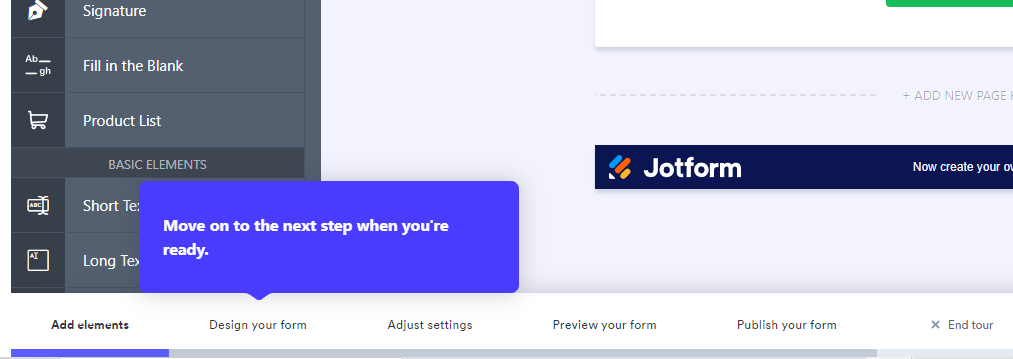
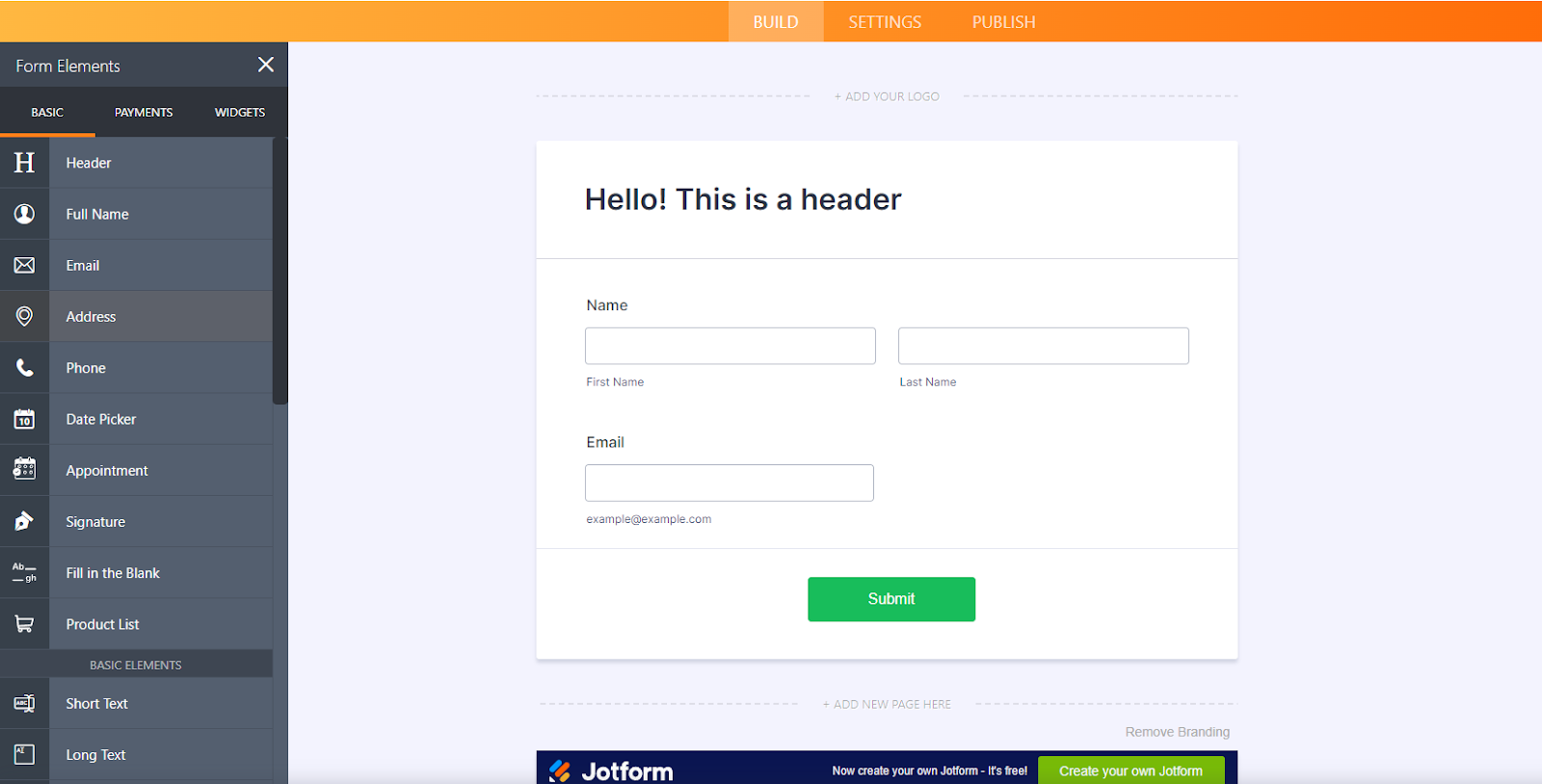
  1. Starting from scratch, you can add the necessary elements that you need by clicking the ‘Add form element’ button. 
  1. Below the screen, you can see categories of which element you wish to add. 
  1. Drag the elements that you want.
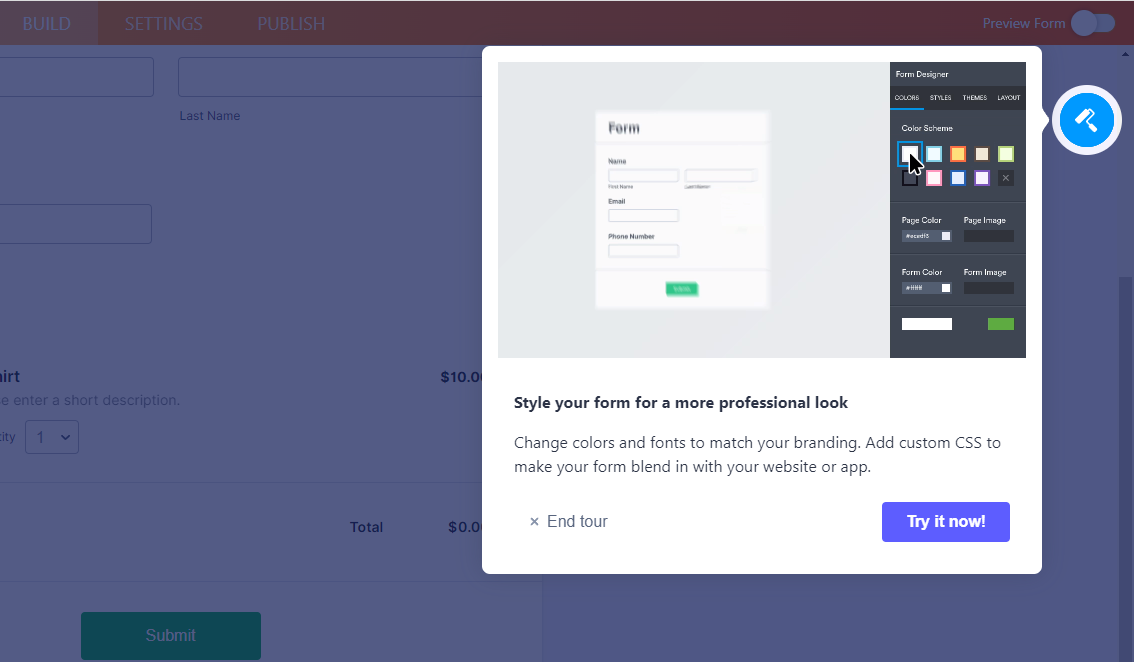
  1. Click the blue button on the upper right corner to design your form.
  1. Add the necessary changes that you want. 
  1. Edit the setting of the application in the setting menu from the buttons on the center.
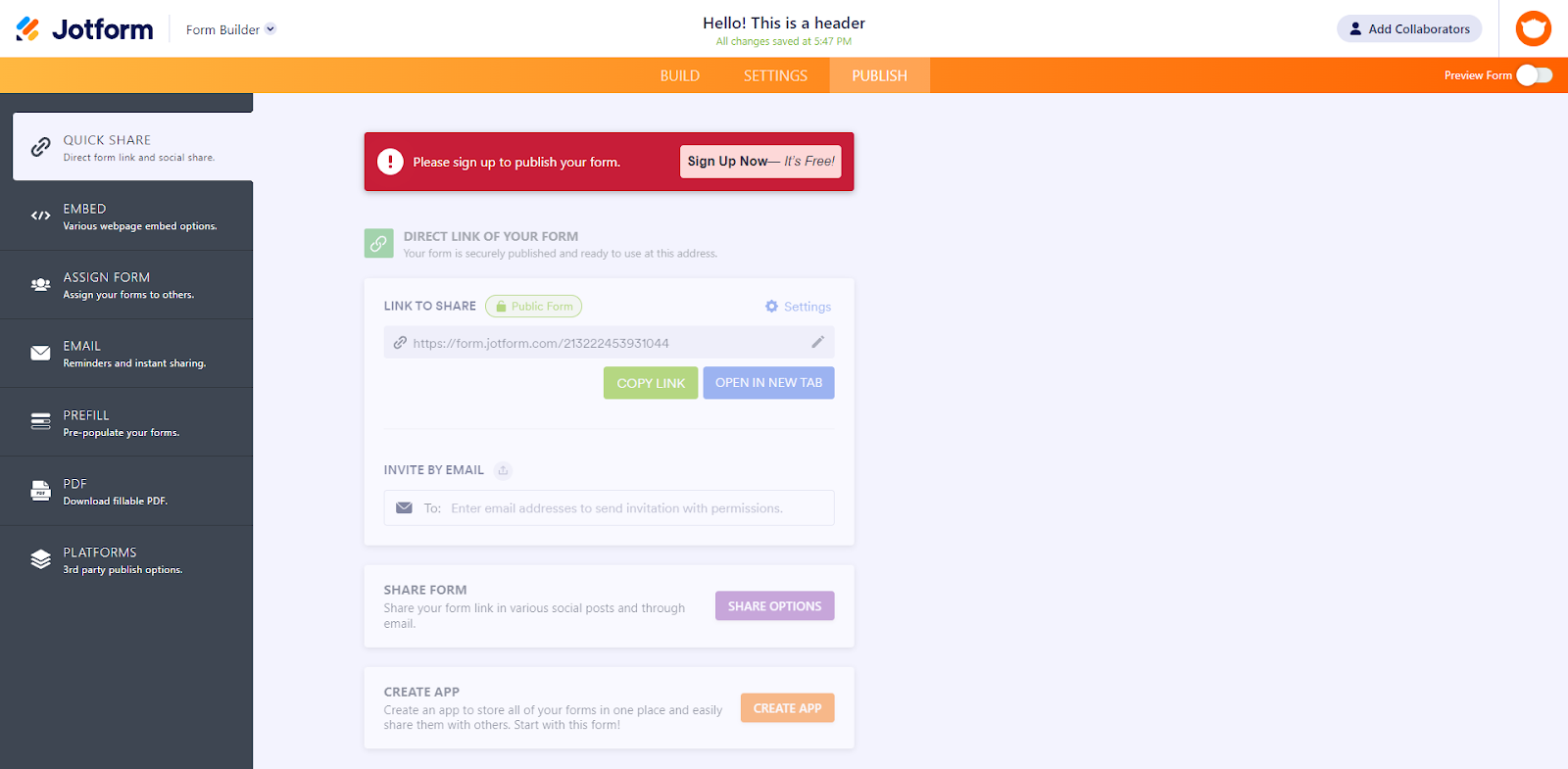
  1. Click ‘Publish’ from the buttons on the center once done editing. Here you have different options as to how you can share the app to others.

💲 Pricing Plans & Support

Jotform offers amazing and attractive pricing plans. 

💎 Starter – $0/Month

This amazing and useful plan is free!

〰️ 5 forms

〰 ️100 monthly submissions

〰️ 100MB available space

〰️ 1,000 monthly form views

〰️ 500 total submission storage

〰️ Unlimited reports, fields per form

〰️ 10 payment submissions

〰️ Jotform branding

💎 Bronze – $24/Month

This amazing and useful plan is only $24 per month!

〰️ 25 forms

〰 ️1,000 monthly submissions

〰️ 10GB available space

〰️ 10,000 monthly form views

〰️ Unlimited total submission storage

〰️ Unlimited reports, fields per form

〰️ 100 payment submissions

💎 Silver – $29/month

This amazing and useful plan is only $29 per month!

〰️ 100 forms

〰 ️10,000 monthly submissions

〰️ 100GB available space

〰️ Unlimited monthly form views

〰️ Unlimited total submission storage

〰️ Unlimited reports, fields per form

〰️ 1,000 payment submissions

〰️ HIPAA compliance available

💎 Gold – $79/month

This amazing and useful plan is only $79 per month!

〰️ Unlimited forms

〰 ️100,000 monthly submissions

〰️ 1TB available space

〰️ Unlimited monthly form views

〰️ Unlimited total submission storage

〰️ Unlimited reports, fields per form

〰️ Unlimited payment submissions

〰️ HIPAA compliance available

📍 The Competition

👍 Pros👎 Cons
👍 Easy to use
👍 Good user interface
👍 Many integrations
👍 Customizable
👍 Good customer service
👎 Cannot use multiple devices
👎 Paid application
👎 Data issues

Reate Powerful Apps With No Code using Jotform

Grist: Evolution of Spreadsheets to Organize Your Data, Your Way

⚖️ Our Verdict

Grist is perfect for small to medium businesses, non-profit organizations, and academics as they can utilize this application to create simple lists, scientific research, inventories, and tracking customers. This is a robust and powerful application for simple data management and visualization. Every use case has its special needs and Grist makes it easy to set up records, establish relationships, and visualize the data. Using this customizable spreadsheet-database hybrid, you can organize, analyze, and share your data.

However, it cannot replace the functionality of excel, so it depends on the main goal of the user. Grist is more like an application rather than a spreadsheet. It is developer-friendly since you can employ codes. If you do not have any coding background, you can use the templates to make your experience easier. 

Overall, this application is easy and intuitive to use, affordable, and a useful application for basic data management needs.

👍 Pros👎 Cons
👍 Intuitive to use
👍 Easy to visualize and share data
👍 Open source
👍 Has free version
👍 Excel-like formula
👎 Needs Python knowledge to fully utilize the app👎 Odd to use at first
👎 Limited features in free version

🌟 About Grist

Spreadsheets are truly a wonder and of amazing value for the world. However, there are some key ways that they fall short and this is where Grist comes in. Grist is a relational spreadsheet and a modern dashboard in one, with every view backed by relational data that is linked and filtered with other views as required. This application goes beyond a normal spreadsheet, to the extent of allowing you to create a custom data application!

Some spreadsheets cannot handle the amount of data, complexity, and collaborators. Grist is as easy to start with as a spreadsheet and can also grow according to your needs. Starting with a spreadsheet, you can observe it grow and end up with a good relational database and a flexible custom application.

Built on a philosophy of openness and extensibility, Grist makes storing data a solid and durable bet. You can rely on this quality, open-code base!

🎁 What’s In It For You?

Grist gives you the flexibility of a spreadsheet and the robustness of a database to organize data in your way. With the simple database builder, Grist allows you to unify your spreadsheets in one beautiful relational structure!

This application allows you to share data in part or in full and also allows you to collaborate with your team in real-time. With the customizable user interface, you can lay out your screen in a way that makes sense for all the data. Grist also offers templates to make your life easier!

Grist lets you take control of your data. With the granular access control, you can set who can see what, even down to each row and column! You can also share with third parties the limited views of the relevant data. With this, you own your data as it is an open-source software, has automatic backups, and no data lock-in.

Grist is more than a spreadsheet. You can view records as customizable data cards, and attach relevant images and files! A data application is not complete without data visualizations, so Grist lets you create dashboard charts and summaries to see the big picture.

🖥️ How Does It Work?

  1. The homepage lists your documents and includes examples and templates.
  1. Add a new document by importing from the add new button.
  1. Select the file of the data you wish to import.
  1. You can filter data by adding a widget then selecting the data.
  1. Group the data identifiers and make them a reference.
  1. Add a detailed view by clicking on the add new button, then the card widget.
  1. Rearrange widgets using drag and drop.
  1. Use Python and excel formulas to sort data.
  1. To create a visual representation of your data, click add new, chart, then select the variables.
  1. Customize the chart using the editor on the right.

💲 Pricing Plans & Support

Grist offers versatile pricing for individuals and teams.

💎 Individual – $0/Month

This deal is free and perfect for individuals!

〰️ 10 documents

〰 ️2 collaborators per document

〰️ Customize layouts

〰️ Dynamic views and charts

〰️ Granular access controls

〰️ Link sharing

〰️ Formulas with python support

〰️ Import/export data

〰️ Automatic backups

〰️ Rate-limited API access

💎 Team – $8/month

This deal is only $8 per month per user and is perfect for teams!

〰️ Unlimited documents

〰️ Collaborators: Team (+2 per doc)

〰️ Everything in individual plan

〰️ Unlimited API access

〰️ Workspaces

〰️ Custom Grist subdomain

〰️ Priority support

💎 Enterprise – $ – /Contact Grist

This deal is perfect for enterprises!

〰️ Everything in team

〰️ Custom number of collaborators

〰️ On-premise deployment

〰️ Custom functionality

〰️ SAML login support

〰️ Use your own domain

📍 The Competition

👍 Pros👎 Cons
👍 Power and functionality of a database
👍 Easy to use as spreadsheet
👍 No-code
👍 Collaboration features
👎 Limited storage
👎 Bugs and functionality issues of formulas
👎 Too many features not used but paid on plan

Organize Your Data, Your Way with Grist

Umso: The Website Builder for Startups

⚖️ Our Verdict

Umso is a great application for creating quick and easy websites. However, with this ease of use, this application lacks a lot of customization features. Nevertheless, this application is perfect for entrepreneurs and small startups to create SaaS websites, mobile apps, and for other digital businesses that aim for high-quality websites and landing pages without wasting time. 

The UI is intuitive and can be understood by anyone even those who lack a background in app design. This application is a good website builder and even their site is created using it. Anyone can create a website even without coding knowledge. The level of customization is great but not outstanding, and it has a number of pre-built themes to pick from. The price is just right for the features that Umso offers. There appear to be 25,344 design combinations available right now!

Overall, Umso is easy and intuitive to use, functional, and essential for creating a site in a matter of minutes and a few clicks!

👍 Pros👎 Cons
👍 No-code
👍 Easy and intuitive to use
👍 Good UI/UX
👍 Responsive team and technical support
👍 SEO focused
👍 Professional looking websites
👎 Paid application 
👎 14-day free trial only
👎 Lacks customization features

🌟 About Umso

Umso, formerly known as Landen, is a web application for building websites. With Umso, you can create, edit, and publish beautiful websites that work to suit your needs. You will be asked about your product, design, and content preferences when creating a new website. The unique generating algorithm of Umso will then generate a basic website for you, which you can then customize to your taste. Publish with a single click once satisfied.

Waste no time with this website builder as this application is the fastest way for startups to go online. More than 30,000 websites were generated from Umso by entrepreneurs and small businesses, and the mission of Umso is to build the best possible website builder for entrepreneurs and startups. This application goes beyond a normal landing page builder.

🎁 What’s In It For You?

Umso allows you to generate, edit, and publish a professional-looking website within a few minutes! Umso does not use generic templates as they automatically generate uniquely beautiful websites based on the function of the application. This application gathers information about your product, then builds the content and style that fits it.

After generating the website, Umso is flexible and it balances flexibility and ease of use. The powerful editor lets you focus on your copy at the same time giving you advanced customization. While editing, you do not need any design skills since the smart layout engine of Umso will adapt to your content automatically. Adjust anything just by dragging the slider! Also, Umso offers a wide variety of illustrations, images, videos, and icons.

Umso lets you publish the website instantly, like a pro! You may now enjoy quick load times and high reliability regarding pageviews. This application also allows you to bring your domain or publish your site to a free Umso subdomain. All of this in a single click!

The best thing about Umso is that it makes your website fast and also, you don’t need to have any coding background as you can take full control of your website with 0 codes

🖥️ How Does It Work?

  1. Click the type of product that you will create.
  1. You can randomly generate a design of your product. Edit the main elements by using the left panel then click save once satisfied.
  1. The upper left buttons allow you to customize components of your product. Using the left panel, you can edit the specifications of your product. Here, you can also edit the text, sizes, colors, links, etc.
  1. You can either save your site or publish it when you are ready.

💲 Pricing Plans & Support

Umso offers simple and transparent pricing so that you are aware of what you are paying!

💎 Basic – $25/Month

This useful and amazing deal is only $25 per month!

〰️ 1 Site

〰 ️$10/extra site

〰️ Unlimited team members

〰️ Custom domain

〰️ Custom code

〰️ Analytics

〰️ Blogs

💎 Startup – $45/Month

This useful and amazing deal is only $45 per month!

〰️ 3 Sites

〰 ️$10/extra site

〰️ Unlimited team members

〰️ Custom domain

〰️ Custom code

〰️ Analytics

〰️ Blogs

〰️ Email lists

〰️ Custom forms

〰️ Cookie banner

〰️ Site and page passwords

〰️ Multi Language support

💎 Business – $75/month

This useful and amazing deal is only $75 per month!

〰️ 5 Sites

〰 ️$10/extra site

〰️ Unlimited team members

〰️ Custom domain

〰️ Custom code

〰️ Analytics

〰️ Blogs

〰️ Email lists

〰️ Custom forms

〰️ Cookie banner

〰️ Site and page passwords

〰️ Multi Language support

〰️ Site export

📍 The Competition

👍 Pros👎 Cons
👍 Has a free version
👍 Drag and drop feature
👍 Good presets
👍 No-code
👎 Difficult to use
👎 Bugs and lags
👎 Heavy application

The Website Builder for Startups: Umso


Assembly 2.0: Automate all workflows in one place

⚖️ Our Verdict

Assembly is an amazing employee recognition platform that can help you scale the culture of your company. It is perfect for small businesses to large companies since the pricing plans and features cover everything. 

During this pandemic, teams are making many sacrifices including employee recognition. With Assembly, you do not need to sacrifice anything! Engage your team with the leading recognition software today. 

Foster engaging teams, grow your company culture, and recognize employees with this application. Overall, Assembly is easy and fun to use, accessible, and a necessity for all remote businesses and companies today. Begin your employee recognition program now!

👍 Pros👎 Cons
👍 Employee recognition
👍 Easy and intuitive to use
👍 Enhance culture-building efforts
👍 Has a free version
👎 Feature and branding often changes 
👎 Limited GIF functionality

🌟 About Assembly

Assembly is a platform for employee recognition, engagement, productivity, and performance management. This application is a no-code workflow automation that is fully customizable and also elevates internal culture. With an all-in-one application, you can integrate all work into one flexible and centralized source of truth. 

This peer-to-peer employee recognition platform allows co-workers to recognize each other easily through delightful messages and rewards. Assembly makes companies manage culture spend with positive and justifiable ROI. With this application, teams can make peer recognition, anniversaries, birthdays, culture prizes, and badges visible. Assembly can help you grow and sustain your culture. 

🎁 What’s In It For You?

Assembly makes bringing together conversations, tasks, and teams seem easy. This application has multiple features that help you save time and make your work easier. With the Slack and MS Teams integration, employees can show peer-to-peer appreciation directly without any interruptions in the communication process. 

This application allows you to use one tool for all communication and productivity tasks, creating a single source of truth that can help optimize your team. Assembly works around flows which is a fully customizable template that can be edited according to your workflow needs. With flows, you can personalize it by adding or removing blocks, changing block types, and choosing the participants of it. This feature saves time for everyone. 

A fun and amazing feature of Assembly is the process of giving recognition. It makes the work environment fun and collaborative!

🖥️ How Does It Work?

  1. In the assembly screen, click add new flow, then start from scratch. Name your flow and add an emoji. 
  1. Choose an action type then click next. Select a trigger type for your flow, either on-demand or scheduled. 
  1. Add participant criteria and edit the specifications. You can also add individual members, emails, exclude others, etc.
  1. Select visibility and edit who can see the flow’s responses. 
  1. For the content, select the kind of block that you want. The open-ended block allows people to add mentions, emojis, GIFs, files, etc. You can also add descriptions for more context.
  1. Finalize your flow by adding descriptions for additional context. Once finished, click the create flow button.

💲 Pricing Plans & Support

With the pricing plans of Assembly, choose the one the works best for your team because happy employees are more productive. 

💎 Starter – $0/Month

This deal that makes employees productive is free!

〰 ️Unlimited flows and blocks

〰️ Up to 10 member seats

〰️ 5GB storage

〰️ Microsoft Teams and Slack bot

💎 Lite – $2.80/Month

This deal that makes employees productive is only $2.80 per member a month!

〰 ️Unlimited flows and blocks

〰️ Up to 50 member seats

〰️ 250GB storage

〰️ Microsoft Teams and Slack bot

〰️ 30 days version history

💎 Standard – $4.50/month

This deal that makes employees productive is only $4.50 per member a month!

〰 ️Unlimited flows and blocks

〰️ Unlimited member seats

〰️ Unlimited storage

〰️ Microsoft Teams and Slack bot

〰️ Unlimited version history

📍 The Competition

👍 Pros👎 Cons
👍 Easy to use and self-sustaining application
👍 Slack integration
👍 Good UI
👍 Employee recognition
👎 Needs additional features for advanced rewards
👎 Weak rewards dashboard
👎 Paid application

Automate all workflows in one place with Assembly 2.0

Usersnap: Get actionable customer feedback to grow

⚖️ Our Verdict

Usersnap is best used by small tech startups to large software companies. User feedback is very important and the ability to act on it defines the success of many products and platforms out there. If you and your product care about user feedback and put customers first, this application is worth trying. 

Even if this application is costly, Usersnap is worth the price as it can heavily influence your product’s roadmap. This product can make the owners’ and the customers’ life easier and help them communicate more effectively with each other. 

Summing it all up, Usersnap is easy to use, worth the price, and an essential application for your customer service needs as it helps both the creators and the customers by providing instant feedback. 

👍 Pros👎 Cons
👍 Visual feedback
👍 Centralized feedback
👍 Good UI
👍 Very easy to implement, set up, and customize according to needs

👎 Open-ended system, the functionality is based on the user
👎 Statistics can be improved
👎 Paid and expensive application

🌟 About Usersnap

Usersnap is a software for customer service to encourage feedback from valuable users, and also to centralize issues and requests. The makers of this app believe that feedback-driven companies deliver the best service for the people. The customers and their stories come first as this company listens, learns, improves, and evaluates just like the customers.  

The core value of Usersnap is to make feedback matter. This application helps software companies to collect customer feedback and measure their experience since the voice of the customer can shape product decisions and strategies. The easier the customer can give feedback, the happier they are to engage with your product.

Usersnap currently has 300m+ feedback widget views monthly, 60k+ customers worldwide, 2m+ feedback items gathered, and 100+ countries where this application is used!

🎁 What’s In It For You?

Usersnap is an all-in-one platform to manage all your feedback. This application gives your web app or site a dedicated feedback button to instantly send in issues, comments, or suggestions. The feedback menu offers various feedback options. Usersnap allows you to link your support chat, help page, or other mediums to streamline the process.

This application lets you gather visual tickets with the screenshot mode. With this feature, users can draw and pin comments while the technical context including browser info, URL, and javascript errors is automatically attached. 

Usersnap also allows you to utilize the qualitative and quantitative surveys triggered by user events, URL paths, or time on the page. In-app forms let you collect in-app feature requests, invite volunteer testers, and schedule user interviews with interception dialogs. 

One amazing feature of this application is the public board. It lets the customers view and keep track of their suggestions by publishing the feedback list. This way, the customers are knowledgeable about the product’s progress and growth. Additional features include feedback trends and statistics, integrations with many tools, data export, and many more!

🖥️ How Does It Work?

  1. The Usersnap menu widget displays all feedback and support options. 
  1. For the user feedback widget, drag and highlight the issue, comment, and send. 
  1. You can assign a team member to fix a bug that is drawn on the screenshot using the bug tracking widget. 
  1. Let users request a feature they need through the feature request widget.
  1. The dashboard can sort, label, and group tickets for better analysis. 

💲 Pricing Plans & Support

Find the best Pricing Plan for all your needs.

💎 Basic – $9/Month

This useful and essential deal is only $9 per month!

〰️ 2+ team members‍

〰 ️1+ feedback project

〰️ Unlimited reporters‍‍

〰️ Add a team member

〰️ Add a project

〰️ Screen recording

💎 Startup – $69/Month

This useful and essential deal is only $69 per month

〰️ 10+ team members‍

〰 ️3+ feedback project

〰️ Unlimited reporters‍‍

〰️ Add a team member

〰️ Add a project

〰️ Screen recording

〰️ Integrate with 2,000 apps‍

💎 Company – $129/month

This useful and essential deal is only $129 per month!

〰️ 15+ team members‍

〰 ️10+ feedback project

〰️ Unlimited reporters‍‍

〰️ Add a team member

〰️ Add a project

〰️ Screen recording

〰️ Integrate with 2,000 apps‍

〰️ Browser error recording‍

〰️ Customer care replies‍

〰️ Custom widget design

💎 Premium – $249/month

This useful and essential deal is only $249 per month!

〰️ 25+ team members‍

〰 ️25+ feedback project

〰️ Unlimited reporters‍‍

〰️ Add a team member

〰️ Add a project

〰️ Screen recording

〰️ Integrate with 2,000 apps‍

〰️ Browser error recording‍

〰️ Customer care replies‍

〰️ Custom widget design

〰️ Remove Usersnap branding

〰️ Integrate via Webhooks

📍 The Competition

👍 Pros👎 Cons
👍 Can check the surveys and run analytics
👍 Easy to use
👍 Does a lot more than your typical survey
👎 High learning curve
👎 Paid application

Get actionable customer feedback to grow with Usersnap!

Tactiq 2.0: Transcribes remote meetings & creates notes for you

⚖️ Our Verdict

Tactiq is recommended for everyone using Google Meet and Web Zoom. It can be used by students, teachers, professionals, and anyone that wishes to transcribe calls easily! The transcription of Tactiq is pretty accurate and the highlight features are really useful. The integration with Google Docs is also a time saver since you can edit the transcription manually.

This application is timely for our remote jobs and classes. You can use it for note-taking in classes and even when creating minutes of the meeting! Download Tactiq if you want to save time in taking notes. 

All in all, Tactiq is easy to use, really affordable, and an essential application for transcribing online meetings!

👍 Pros👎 Cons
👍 Auto highlight and auto summarize 
👍 Time-stamped transcripts with speakers
👍 Has a free version
👍 Supports English, Spanish, French, German, and Portuguese 
👍 Has integrations 
👎 Google meet and Zoom web calls only
👎 Limited free features

🌟 About Tactiq

Tactiq is a chrome extension that transcribes Google Meet and Web Zoom meetings. This application was created to help people stay focused during meetings and save the time spent on note-taking. With Tactiq’s real-time transcription of Google Meet, you will never miss a word!

Tactiq is an officially recognized Google Cloud partner. This application is the number one transcription tool for Google Meet. With that, one million meetings are being transcribed every month using this app!

The best part is that Tactiq is 100% free to download. Using this application, you can now stay engaged with meetings without missing a word!

🎁 What’s In It For You?

Your Website Title
How to Share With Just Friends

How to share with just friends.

Posted by Facebook on Friday, December 5, 2014

Tactiq allows you to stay focused in your Google Meet or Web Zoom meetings by automatically transcribing the calls then creates notes for you. With this application, never forget the important stuff as it captures conversations with 100% accurate built-in speaker identification. 

This application provides you with time-stamped transcripts w/ speaker names. Tactiq also lets you pause transcription if you do not need it. The supported languages of Tactiq are English, Spanish, French, German, and Portuguese. 

This application allows you to use another useful feature which is autocorrect. Tactiq has integrations including Google Docs, Quip, Slack, Notion, and many more! After the call, you can save the whole conversation and share it with whatever is convenient. 

Ready to get more out of your meetings? Use Tactiq and never miss a word, literally!

🖥️ How Does It Work?

  1. Download the extension.
  1. Open Google Meet, then click on the Tactiq extension. The widget will appear on the right side of the screen.
  1. Turn on the captions and Tactiq will automatically transcribe the meeting.
  1. Click on a text to highlight it, or click the highlight button to highlight the next sentence. 
  1. Click the extension to save the transcript to Google Docs or download it as a TXT file. 
  1. On Google Docs, the meeting transcription is automatically labeled and you will find highlights at the top. 

💲 Pricing Plans & Support

Tactiq offers a clear pricing! Choose a plan that works for you.

💎 Free – $0/Month

This essential deal is free!

〰️ 30/mo auto-saves

〰️ Time-stamped notes

〰️ Basic integrations

〰️ Speaker identification

〰️ Click to highlight

〰️ Save in-call chat

〰️ Meeting Engagement

💎 Pro – $9/Month

This essential deal is only $9 per month!

〰️ Unlimited auto-saves

〰️ Time-stamped notes

〰️ Advanced integrations

〰️ Speaker identification

〰️ Click to highlight

〰️ Save in-call chat

〰️ Meeting Engagement

〰️ Custom tags

💎 Team – $20/month

This essential deal is only $20 per month!

〰️ All in Pro Plan

〰️ Team collaboration

〰️ Security controls

〰 Admin analytics

〰️ API access

〰️ Analytics

〰️ Advanced search

〰️ Team engagement

📍 The Competition

👍 Pros👎 Cons
👍 Record meetings
👍 Transcribe live meetings or audio files
👍 Collaboration features
👍 Search across items and highlights
👎 No pause feature
👎 Limited free features

Transcribe remote meetings & create notes with Tactiq!

RemNote: The all-in-one tool for thinking and learning

⚖️ Our Verdict

RemNote is a great substitute for other note-taking apps and flashcard apps as it has both features. It is best used and is highly recommended for students, researchers, and professionals. 

With this application, you can have higher grades as a student, link and organize ideas as a researcher, and organize your thoughts, plans, and tasks as a professional. You can now build knowledge that lasts forever especially because of the offline mode this app offers.

Although this application has many amazing features, it might be hard for a newbie to become familiarized with all of the features of RemNote. This app has a learning curve, but it is worth the time and effort as it can be very essential to your needs.

Overall, RemNote is packed with features, affordable, and an essential application for students and professionals alike.

👍 Pros👎 Cons
👍 Create flashcards and notes in one app
👍 Many features and versatile
👍 Has a free version
👍 Create a knowledge base
👍 Available on web, desktop, and mobile
👎 Complex app if inexperienced
👎 Mobile app still in beta
👎 Limited features on free 

🌟 About RemNote

RemNote is an all-in-one tool for both thinking and learning. It is not like other note-taking apps as it has multiple features that can help you learn, stay organized, and think. RemNote’s mission is to reinvent how people learn, think, and collaborate. 

RemNote is an MIT-born startup that came into existence due to frustrations with existing learning tools. This application was created to streamline thinking, connect ideas, and optimize learning for the long term.

RemNote is built to be an all-in-one thinking and learning workspace to help individuals and teams to organize their thinking, to master their craft, and to grow their knowledge. 

🎁 What’s In It For You?

RemNote offers an all-in-one tool for learning and creating. This application goes beyond any normal note-taking tool as it also offers flashcards, PDFs, backlinks, and many more, all to help you stay organized and learn.

RemNote allows you to take notes normally; capture ideas, docs, and outlines. This application also lets you utilize smart flashcards created directly from your notes. It allows you to spend less time studying while getting higher grades. 

RemNote lets you easily highlight, reference, and link all of your source material so you do not have to switch between apps. With RemNote, you can acquire local-only knowledge bases and own your data for free!

🖥️ How Does It Work?

  1. You can freely customize your notes and write anywhere or everywhere you want.
  1. Hyperlink a word using the rem references by typing “[[“ before a word that you want to link.
  1. Tag related pages that you want to be together.
  1. Rem is a bullet point; a document is a rem that is tagged with a hashtag; a folder is a document that has another document inside.
  1. Regular portals allow you to look into other notes. Changes are reflected on all sides.
  1. To use flashcards, type the first letter of the word with capital in order to make it a concept.

💲 Pricing Plans & Support

With RemNote’s pricing guide, find the pricing plan that fits your needs the most!

💎 Free – $0/Month

This essential deal is free forever!

〰️ Linked writing and Zettelkasten

〰 ️Convert notes to flashcards

〰️ Personal knowledge management

💎 Pro – $6/Month

This essential deal is only $6 per month!

〰️ Access to all features

〰️ Early access to new features

〰️ Priority support

💎 Life-Long Learning – $300/one-time

This essential deal is only $300 for a one-time payment!

〰️ Access to all features

〰️ Lifetime desktop pro access

〰️ Cloud storage for 5 years

📍 The Competition

👍 Pros👎 Cons
👍 Has templates
👍 Highly customizable
👍 Collaboration features
👍 Great UI/UX
👍 Databases
👎 Limited features in free version
👎 Lack option for visualizing data
👎 No real offline mode

Get an all-in-one tool for thinking and learning with RemNote!

Related read: RemNote is built around spaced repetition for studying. If your notes are mostly code snippets and runbooks rather than flashcards, Boostnote fits that workflow better.