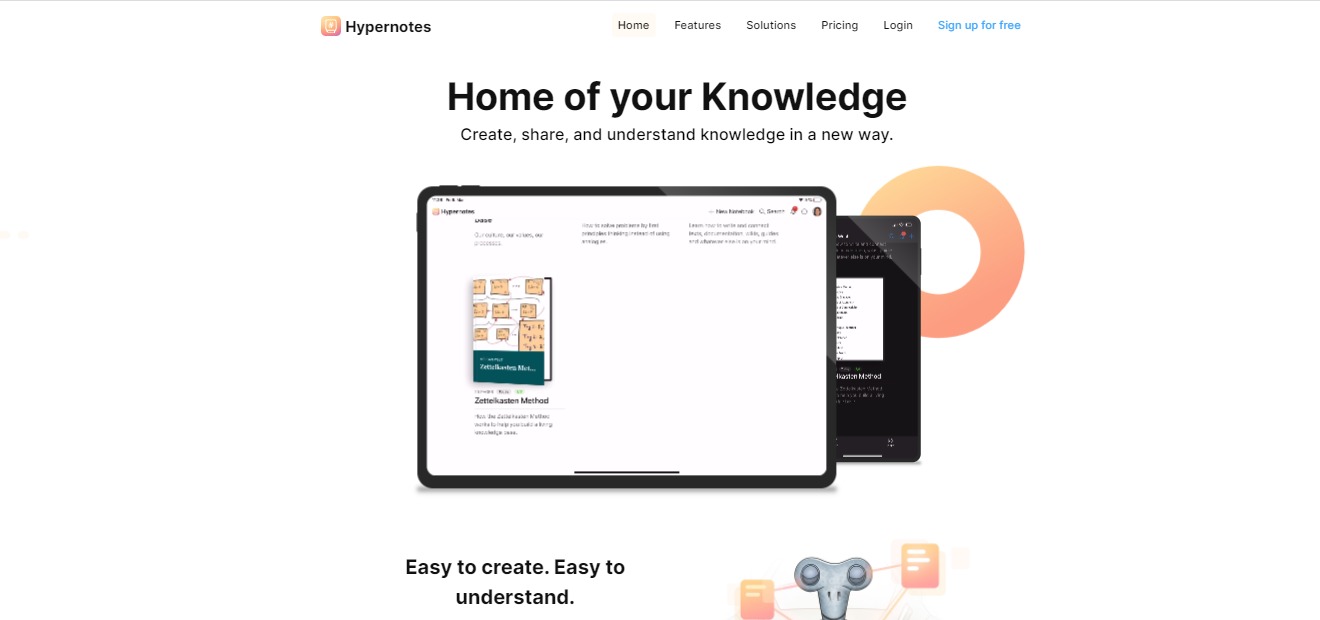
Hypernotes: Create, share, and understand knowledge in a new way

⚖️ Our Verdict

Most note-taking apps have limited features that help you organize your knowledge. Even if you created your valuable notes, sometimes it gets out of hand and becomes useless because your notes are not organized. All of your efforts will go to waste if that instance happens all the time. 

With Hypernotes, all of your notes and ideas are secured through a link of knowledge. It is easy to use, from students to large corporations. This tool will be practical and essential for you. It is accessible and plays utmost importance in your note-taking!

👍 Pros👎 Cons
👍 Bi-directional linking 
👍 Outlining
👍 Super-powered collaboration features
👍 Mobile apps on all platforms and offline access
👍 Free plans available
👍 Available on App Store and Google Play
👎 Need to sign up 
👎 Free account has limited features

🌟 About Hypernotes

Hypernotes is a note-taking app that features the connection of knowledge. The app removes the limitations on pre-defined hierarchies and folders that some knowledge base apps have. It makes your notes more organized, actually useful, and easy to understand. The app prevents valuable knowledge from going to waste by creating a web of notes through links. 

In Hypernotes, the notes are originally linked to one another, so every note that you have made will be more accessible to you even if you have numerous of them. Hypernotes creates a knowledge base. The more you write, the more links you create, resulting in extensive knowledge.

To generalize your ideas, Hypernotes features a knowledge graph that shows all the connections of your notes, giving you a better grasp of what you created. Hypernotes also have great collaboration features like in-line task creation, task assignments, due dates, and notebook level overviews making this app suitable for groups too.

These are some of the gold-standard features of Hypernotes for personal and organizational management:

🔁 Bi-directional linking between related notes

📝 Outlining of large topics into smaller sub-topics,

💡 Automated suggestions to link related but as yet unconnected notes,

📃 Embedding of text blocks to reduce duplicate content,

🔗 Knowledge graph for better discovery,

👯‍♀️ Extensive collaboration on the task, note, and notebook level,

📱 Mobile apps on all platforms and offline access.

🎁 What’s In It For You?

With Hypernotes you will have fewer interruptions to your natural writing process. It lets you save time from searching your notes. Automatically linked pages avoid the duplication of content. Hypernotes also lessens miscommunication because of its organized structure. 

Users of Hypernotes will experience a better transfer of knowledge, better understanding of texts, and better representation of ideas. This app also provides more creativity and more collaboration on resources.

🖥️ How Does It Work?

  1. Make detailed notes
hypernotes
  1. Collaborate
hypernotes
  1. Suggested references make linking thoughts easy
hypernotes
  1. The graph button on the left shows the connected knowledge that you created
hypernotes
  1. You can focus on a key concept by clicking it
hypernotes

💲 Pricing Plans & Support

Hypernotes offers different plans that suit you best. You can avail of the personal account by signing up for free or pay a monthly or annual basis for the other plans that come with additional features.

hypernotes

💎 Personal – Free

Get the amazing features of Hypernotes for personal use for free!

〰 Up to 2 notebooks

〰 Up to 2 members per notebook

〰 600 MB storage for files & attachments

〰 4 weeks of activity history

〰 Up to 3 Zenkit Suite Connections

〰 Multi-level Outlining available

〰 Bi-directional linking available

〰 Tasks and reminders available

💎 Plus – 8 €/Month per user

Get the amazing features of Hypernotes for powerful collaboration for only 8€ a month per user!

〰 Up to 30 notebooks

〰 Up to 30 members per notebook

〰 6 GB storage for files & attachments

〰 Unlimited activity history

〰 30 Zenkit Suite Connections

〰 Multi-level Outlining available

〰 Bi-directional linking available

〰 Tasks and reminders available

〰 Email to Collection (coming soon) available

〰 Theme customization available

〰 Provisioning (SCIM) available

💎 Business – 19 €/Month per user

Get the amazing features of Hypernotes for growing teams for only 19€ a month per user!

〰 Unlimited notebooks

〰 Unlimited members per notebook

〰 60 GB storage for files & attachments

〰 Unlimited activity history

〰 300 Zenkit Suite Connections

〰 Multi-level Outlining available

〰 Bi-directional linking available

〰 Tasks and reminders available

〰 Email to Collection (coming soon) available

〰 Theme customization available

〰 Provisioning (SCIM) available

〰 SSO (SAML) available

〰 Activity auditing available

〰 Central user management available

〰 Additional payment options available

💎 Enterprise – Available for inquiry

Get the amazing features of Hypernotes for enterprise-wide collaboration!

〰 Unlimited notebooks

〰 Unlimited members per notebook

〰 Unlimited storage for files & attachments

〰 Unlimited activity history

〰 3000 Zenkit Suite Connections

〰 Multi-level Outlining available

〰 Bi-directional linking available

〰 Tasks and reminders available

〰 Email to Collection (coming soon) available

〰 Theme customization available

〰 Provisioning (SCIM) available

〰 SSO (SAML) available

〰 Activity auditing available

〰 Central user management available

〰 Additional payment options available

〰 Advancement identification management available

〰 Custom API limits available

📍 The Competition

👍 Pros👎 Cons
👍 Perfect balance of tools
👍 Good editing interface
👍 Clean, unobtrusive and customisable UX
👍  Lightweight Kanban and Airtable-like tables are huge
👍 User friendly and simple to use
👎 COST: Highly prohibitive free tier
👎 No way to organize random snippets
👎 No browser extension, no handwriting support

Create, share and understand knowledge with Hypernotes!

Related read: Hypernotes maps how ideas link into a knowledge graph. For a simpler offline notebook that stores developer notes as portable Markdown, Boostnote is worth a look.

Hypernotes FAQ

What does Hypernotes software do?

Hypernotes is a note-taking and knowledge-base app built around links instead of folders. You write, it suggests connections to things you have already written, and a knowledge graph shows how the pieces sit together. The practical effect is that a note from months ago surfaces when it becomes relevant, rather than waiting in a folder you have forgotten about. It comes from Zenkit and shares an account with the rest of the Zenkit suite.

Is there a free version of Hypernotes?

Yes. The Personal plan costs nothing and covers 2 notebooks, 2 members per notebook, 600 MB of file storage, and 4 weeks of activity history. Bi-directional linking, multi-level outlining, tasks, and reminders are all included at that tier, so the free plan is a working version rather than a demo. Plus is 8 euro per user per month and lifts the limits to 30 notebooks and unlimited history. Business is 19 euro per user per month, and Enterprise pricing is quoted on request.

How is Hypernotes different from Notion or Obsidian?

Obsidian is the closest comparison, since both are built on bi-directional links and a graph view. Obsidian keeps plain files on your own machine and leans on community plugins for anything beyond that, while Hypernotes is hosted and ships collaboration in the core product, with task assignment and due dates at note and notebook level. Notion is the wider workspace, strong on databases and templates, where linking is something you do deliberately. Hypernotes proposes the links for you.

Does Hypernotes work offline, and on which platforms?

Mobile apps ship for every platform with offline access, and the apps are on the App Store and Google Play. Notes written without a connection sync once you are back online. An account is required even on the free plan, because the linking and collaboration features run server side.

Audiblogs: Listen to Any Web Article in Your Podcast Player

⚖️ Our Verdict

There’s a reason why video content does better than blogs. And there’s also a reason why podcasts are starting to grow in popularity. And that reason is that people don’t have time to read. In today’s fast-paced world, stopping by to read a blog or an article takes a whole lot of time. People prefer to watch or hear about stuff. This is why Audiblogs is in such demand!

Audiblogs automatically turns any web article into a podcast so you can listen to it anywhere you are. It makes your life easier, simpler, and more convenient. 

👍 Pros👎 Cons
👍 Free Chrome extension
👍 Ready in seconds
👍Compatible with any podcast player
👍 No signup required
👎 Not compatible with Spotify, Stitcher, Pandora, TuneIn & iHeartRadio

🌟 About Audiblogs

Audiblogs was born to provide everyone with a tool that can turn any web article into audio podcasts. With this tool, you can now go through all of your reading backlogs easily. It saves a lot of time and effort on your end. Co-founders Kyle & Eric initially created Audiblogs for themselves, and it quickly grew into one of the most-used tools today.

🎁 What’s In It For You?

With your busy schedule, it’s understandable why you have so many articles saved, and have not gone through them yet. Fortunately for you, Audiblogs can solve that problem easily. 

Now, you can use Audiblogs to “read” while you do your errands, exercise, cook, and more! If you’re someone who loves to read, but can’t find enough time, this is the perfect tool to use!

🖥️ How Does It Work?

To use Audiblogs, please visit their website at https://audiblogs.com/.

Click on “Add to Chrome” and you will be redirected to the Chrome Web Store

Add the extension to your Chrome browser, and you will be redirected to this page:

Next, open any article on the web, and click on the icon for Audiblogs.

Click on “Listen in Browser.” You will be redirected to this page where you can listen to the article.

Pretty easy right? Get Audiblogs now! It’s free. 

💲 Pricing Plans & Support

Audiblogs is free to use for everyone. Don’t you just love this tool? It’s just like listening to audiobooks without the fees!

Listen to any webpage in your Podcast player with Audiblogs!

Mailman: Tame Your Inbox, Boost Your Productivity

⚖️ Our Verdict

If you want to save a tremendous amount of time filtering through your emails, just use Mailman! This amazing tool is not just a tool, it’s basically your personal email assistant that helps shield you from irrelevant emails. At the end of the day, you can rest easy knowing you saved time and effort filtering your emails, and you boost your productivity levels way up!

👍 Pros👍 Cons
👍Works with your favorite email client
👍Easy to use and integrate
👍Do not disturb mode
👍Delivery slots
👍Block unimportant emails
👍21 day free trial
👍Mailman does what it advertises to do, and it’s very effective! We can’t say anything negative about it. 

🌟 About Mailman

Mailman was created to help unorganized email inboxes become, well… organized! It’s as simple as that! It’s a productivity-boosting tool that has helped save a lot of people thousands of hours just by organizing their inbox.

🎁 What’s In It For You?

If you are tired of organizing your inbox every single day (sometimes even twice a day), then Mailman should be your go-to app. Not only does it help calm your cluttered inbox, but it also has a lot of cool features for you!

You can use the “Do Not Disturb Mode” which lets you preset hours where you do not want to be disturb. Whether you need a break from emails after a long day, or simply wants to focus on your workload, Mailman will make it so you won’t have to be disturbed at specific hours.

You can also use their “Delivery Slots” feature. It’s a great feature where you can set Mailman to deliver your emails at hourly intervals. You are in control. Figure out what works best for you, and let Mailman handle it. 

Plus, if you’re tired of unimportant emails, you can easily block them to avoid distractions. And if you are waiting for important emails, you can add them to your VIP list so you can see them immediately.

🖥️ How Does It Work?

To use MailMan, simply visit their website at https://www.mailmanhq.com/, and click Sign in With Google.

Check the permission requests and click “Continue Signing In”

Once you’ve set the permissions, you will be redirected to a Dashboard where you can Activate Mailman and customize your settings. Pretty easy, right? It takes less than 1 minute to set up!

💲 Pricing Plans & Support

Mailman only comes with 1 plan: Standard. You get access to all the features and use multiple inboxes. 

💎Standard – $8/month paid annual or $10/month paid monthly

〰️ Snooze your inbox

〰️Custom delivery schedule

〰️Custom Do-Not-Disturb period

〰️ VIP Lists

〰️Unlimited Blocking

〰️ Multiple inboxes

Motion: Boost Your Productivity Levels

⚖️ Our Verdict

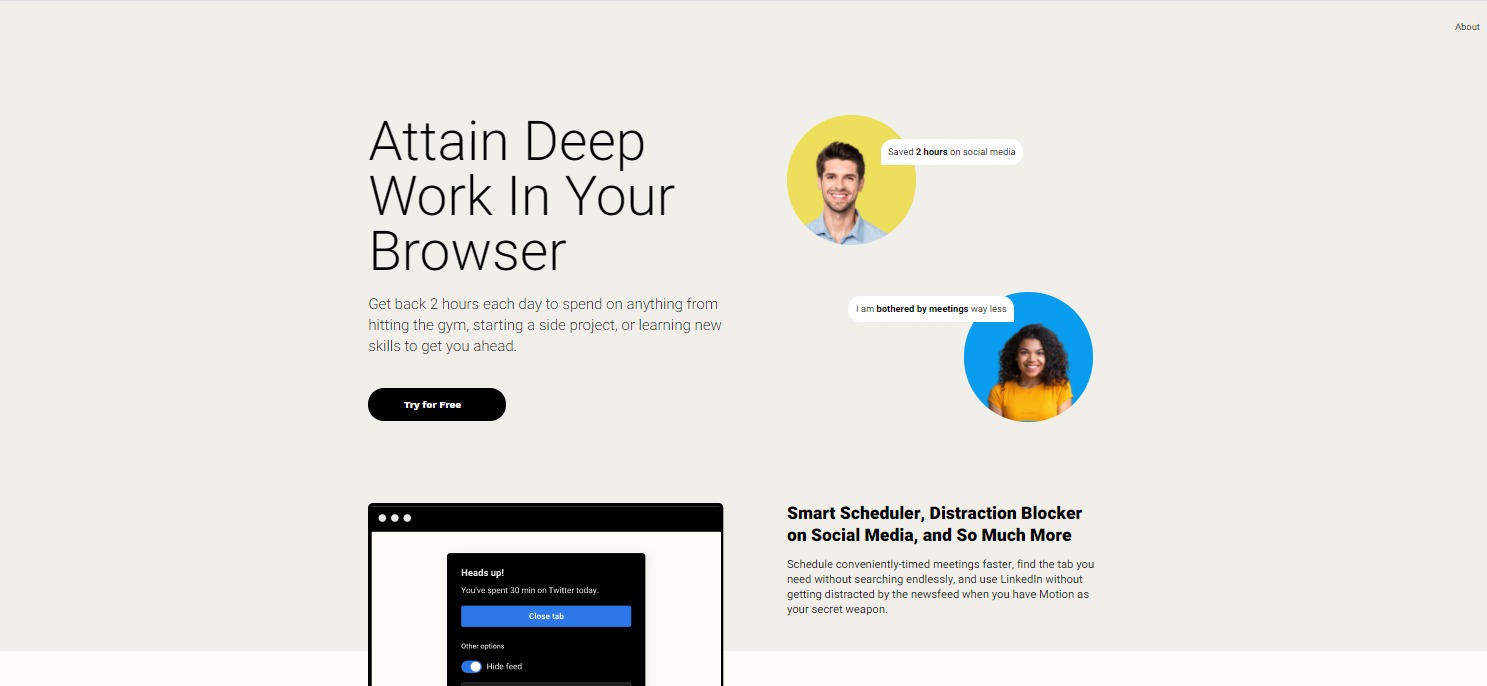
Did you know that you lose more than an hour of your day to unproductivity? This is especially true when you’re using web browsers. Motion is an easy-to-use Chrome extension that helps boost productivity levels. 

This handy Chrome extension helps you cut online distractions away and speed up your process. It actively prevents you from getting distracted by intercepting distracting sites, sending reminders, and showing reports with actionable insights.  Best of all, Motion personalizes its services for every customer. With Motion, you can say goodbye to distraction and procrastination. You can focus on the important stuff even more. 

👍 Pros👎 Cons
👍 Saves you at least 1-2 hours per day
👍 Increases productivity
👍 Hide distracting UI components 
👍 Displays your current task and how long you’ve been working on it 
👍 Shows periodic, non-intrusive reminders
👎 Only works on Chrome for now. 

🌟 About Motion

Motion was started to give people back their time, and save them from spending more time on distracting websites. Time is our most valuable resource, and most of the time, we spend it browsing the internet for unnecessary stuff. Those hours are wasted, and you can’t get them back. But with Motion, you can save time.

This amazing extension actively prevents its users from getting distracted on the web. It uses real-time interventions to help you avoid distractions. 

🎁 What’s In It For You?

The best part about Motion is that it’s an all-in-one tool for productivity and efficiency. It saves you time on projects you’re working on with a set of tools that helps you browse faster and get more done. 

Let’s be real, you can use Motion to help you with time management, but it only works if you allow it too. You can’t set motion into your browser and disregard all the things it does for you. The goal is to save you some time each day so you can focus on the important stuff. 

Not only that, but they offer different tools such as pop-up calendars, tab management, and etc. Their anti-distraction system keeps your time on social media concise and productive. It helps you stay focused with alerts and their sophisticated distraction removal system.

🖥️ How Does It Work?

To try Motion for yourself, visit their website at https://www.inmotion.app/. Click on Start Free Trial.

Next, click on Sign Up with Google

Once you’ve signed up, you’ll be redirected to a billing page for your billing options. Choose what works for you best. The yearly option is recommended, so you can save 25%. Then enter your card details. Don’t worry, you can cancel anytime, but we don’t really see why you would want to. This extension is a life-changer!

Once you finish the installation, you will be redirected to a page where you can sign in.

You can also set up Motion in your desktop.

Then, you’ll be redirected to a page where you can watch video tutorials.

After that, you can use Motion anywhere on your Chrome browser or your Desktop.  You can see the little Motion widget on the side of your Browser.

💲 Pricing Plans & Support

Motion costs $20 per month. However, if you want to save 25% off, you can choose the annual billing which only costs $15 per month.

📍 The Competition

👍 Pros👎 Cons
👍 Free Chrome Extension
👍 Blocks website that you don’t want to see
👍 Free yourself from distractions
👍 Features focus mode
👍 Features password protection
👎 There’s a limit to numbers of words you can block

Boost Your Productivity Levels with Motion!

Taskade: Collaborate, Organize & Get Things Done

⚖️ Our Verdict

No matter what your job is, and who you are, getting organized is something most of us struggle with. Even the best of us struggle with organization sometimes. Fortunately, there’s an easy way to keep things on track. With Taskade, you can collaborate, organize and get things done!

This incredible tool is perfect for busy moms, entrepreneurs, managers, freelancers, students, and more! In short, it’s for everyone. We highly recommend Taskade if you want to get organized and get things done!

👍 Pros👎 Cons
👍Simple and effective way to collaborate
👍Organize tasks easily
👍Share tasks with team members
👍Mobile access
👍Spreadsheet view
👍Time tracking
👍Timeline view
👍Task management
👎We’ve used Taskade, and it gets the job done every time. So far, we have no cons!

🌟 About Taskade

Taskade 3.0 is an incredible collaboration tool. It was created by a team of remote workers. It’s an effective collaboration tool that allows every team member to communicate and coordinate remotely.

No matter where you are in the world, you can use Taskade to get organized. It was created to allow teams to manage projects, brainstorm ideas, chat and all each other seamlessly. Everything you put inside this incredible app gets synced real-time across all devices. 

The creators of Taskade believe that the future of work is remote, asynchronous and real time. This is why having a unified workspace such as this tool is the answer to getting work done.

You can download Taskade on iOS, Android, Mac & Windows.

🎁 What’s In It For You?

As we’ve mentioned above, Taskade is a simple tool. It’s flexible, and it allows you to manage tasks, organize between teams, and communicate. 

With Taskade, you can create chats with team members, assign and organize tasks, map out your workflow and more. All of these can be done inside this unified workspace.

Its simple user interface is perfect for everyone; from beginners to experts. You can customize the interface and transform it into any workflow. 

Taskade also features a team roadmap where you can plan, organize and prioritize tasks days, or even weeks ahead. With its tracking feature, you can see which team members are working on which tasks, and how far along they are in the process.

🖥️ How Does It Work?

  1. You can try Taskade for yourself by visiting https://www.taskade.com/new


2. As you can see, the interface is very simple, yet it is so effective. Over here, you can make calls and chat with team members.

3. You can also click on “List” here to change the interface.

4. This is what the “Board” view looks like

5. This is what the “Action” view looks like:

6. The “Mindmap”

7. And the “Org Chart”

8. You can customize the presets and colors here

9. And view all features by clicking on “New”

💲 Pricing Plans & Support

The best part about Taskade is that it’s free for freelancers and growing teams. They have three options: Free, Unlimited, and Enterprise. Check them out below.

💎 Free

〰️free forever

〰️100MB Storage

〰️Unlimited Tasks

〰️Unlimited Projects

〰️Unlimited Collaborators

💎Unlimited

〰️user per month

〰️Unlimited Storage

〰️Unlimited Tasks

〰️Unlimited Projects

〰️Unlimited Collaborators

💎Enterprise

For organizations that need additional security, control, and support. contact Taskade here.

To see a full price comparison, visit https://www.taskade.com/pricing.

📍 The Competition

Taskade is up with some big competitors in the market. Check them out below:

👍Pros👎Cons
👍Free trial
👍Reporting & project tracking
👍Skill tracking
👍Collaboration tools
👍Drag & drop interface
👎No forecasting
👍Pros👎Cons
👍Free trial
👍Collaboration tools
👍Employee activity monitoring
👍Remote access
👎No video chatNo timezone trackingNo livechat

Collaborate, Organize & Get Things Done with Taskade!

Hello Benji: Manage Your Money Like a Pro

⚖️ Our Verdict

While Hello Benji is still in its beta phase, we were able to try its features. We can tell you now that this tool holds a lot of promise! It doesn’t matter if you’re a large business, an entrepreneur, or a freelancer, Hello Benji can help you manage your finances like a pro! After all, who wants to spend too much time stressing over where their money went, right?

With Hello Benji, you can keep track of your finances easily, so you can spend more time making more of it. If you want to try this amazing tool, be sure to visit their website here. You won’t regret it!

ProsCons
👍 Finance autopilot
👍 Maximize your money
👍 Easy Customization
👍 Built for you
👍 Make Tax season a breeze
👎 Room for improvement as it is still in its beta stage

🌟 About Hello Benji

Hello Benji is a startup project that’s on a mission to remove the barriers and stress of becoming your own boss. Let’s face it, managing finances is not the easiest thing in the world, even if you’re a pro at it. 

The team behind this incredible tool is on a mission to make your money work harder than you. And with it, you are definitely one step closer to that goal!

🎁 What’s In It For You?

If you are someone who has a hard time managing your finances, or you simply hate going through numbers, well, Hello Benji is the right tool for you! It eliminates the stress of going through every financial matter – even on tax season.

Hello Benji will be your best friend throughout your everyday life. It helps you make your own financial decisions without hourly bill rates, or waiting for an appointment. How good is that? 

It keeps track of your expenses, finances, and your life goals in one easy app! You can create a personalized plan for your life goals and needs and access your current finances wherever and whenever you want.

But, that’s not all it does, too! If you’re someone who hates tax season, let Hello Benji handle that for you. This incredible tool helps you prepare for tax season so you don’t have to stress yourself out over it. 

Using this tool, you can literally find thousands of dollars in opportunities and tax savings every year. Who wouldn’t want that?

🖥️ How Does It Work?

HelloBenji is a relatively simple app, it’s still in its beta stage, and it’s only currently available for United States customers. 

In able to access the app, simply go to https://hellobenji.com/, click the sign up button and create your account.

You will be redirected to their user interface where you can put your finances and expenses.

They also have a cool feature that helps forecast your future. You no longer have to waste money waiting for answers on your finances. With this feature, you can plan your future when and how you want it. Simply add your options and adjust to your lifestyle.

Another cool thing you could do with HelloBenji is maximize your money. The app gives you options for tax savings, investment opportunity, and helps you capitalize on your money.

💲 Pricing Plans & Support

Since HelloBenji is still in its Beta stages, there are no pricing plans yet. However, if you want to be one of the first lucky ones to try this app, you can claim your spot for their private launch soon. To be waitlisted, simply visit their website at https://hellobenji.com/. Remember, this is a private launch, and only very few people have the opportunity to be one of the firsts to try. So claim your spot, now! We’re on the list, too!

📍 The Competition

There are also multiple financial planning and budgeting apps you can try. We’ve made a list for you, check them out below.

ProsCons
👍 Balance Sheet
👍 Consolidation/Roll-Up
👍 General Ledger
👍 Multi-Department/Project
👍 Asset Planning
👍 Cash Management
👎 Noting variances in a report can be tricky at times

ProsCons
👍 “What If” Scenarios
👍 Balance Sheet
👍 Consolidation/Roll-Up
👍 General Ledger
👍 Cash Management
👍 Asset Planning
👍 Profit/Loss Statement
👎 Additional modules need to be purchased to handle pre-paid insurance automatically and forecast inventory

Manage your money like a pro with HelloBenji!